
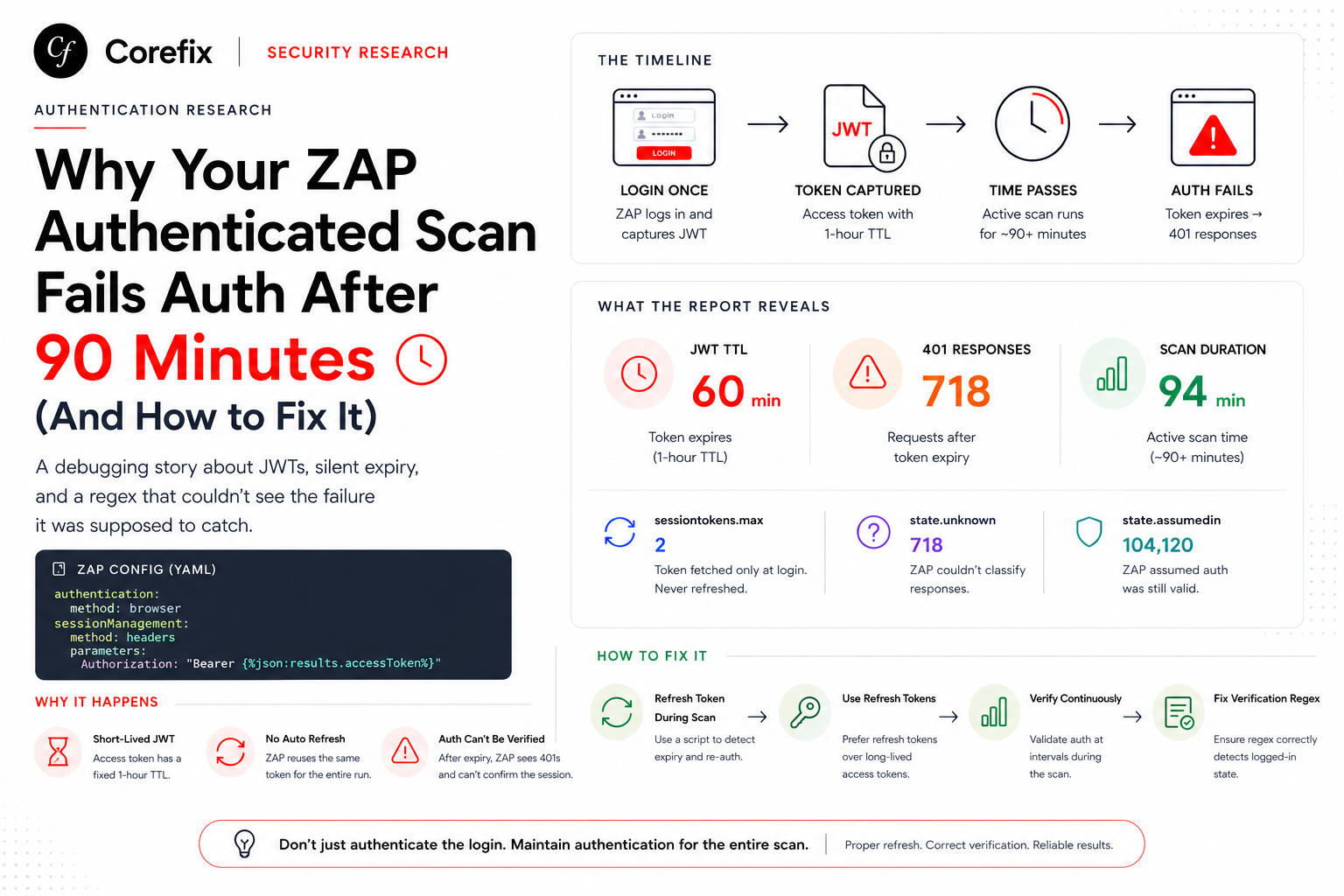

A debugging story about JWTs, silent expiry, and a regex that couldn't see the failure it was supposed to catch.
If you've run OWASP ZAP's Automation Framework against a real production-style app with token-based auth, you've probably hit this exact wall: your scan works perfectly for a quick smoke test, then mysteriously reports auth.summary.auth: false the moment you let the active scanner run for real. Same YAML. Same credentials. Same container. The only thing that changed was time.
This post walks through how we diagnosed it, the two wrong turns we took along the way, and the actual fix — because the failure mode here is genuinely counter-intuitive if you're reading the ZAP report for the first time.
The symptom
Two runs, identical automation plan:
| Run | Duration | auth.summary.auth |
|---|---|---|
| Spider + AJAX spider only, no active scan | ~2 min | ✓ true |
| Same config + active scan enabled | ~94 min | ✗ false |
Every diagnostic sub-check passed in both cases — username field found, password field found, session handling identified, verification URL identified. Only the top-line auth flag flipped. That combination is confusing on first read, because it looks like the auth setup is fine but something else is broken.
It isn't. The setup was fine. The session just didn't survive the scan.
Root cause: the access token expires mid-scan
The target app authenticates via a short-lived JWT Bearer token, wired into ZAP like this:
authentication:
  method: browser
  parameters:
    browserId: firefox-headless
    loginPageUrl: https://uat1.iviscloud.net/
    loginPageWait: 30
sessionManagement:
  method: headers   # resolved from 'autodetect'
  parameters:
    Authorization: "Bearer {%json:results.accessToken%}"
ZAP logs in once, grabs the token from the JSON login response, and reuses it as a static header for the rest of the run. Decoding the JWT told us exactly how much runway we had:
{
  "iat": 1783955480,
  "exp": 1783959080
}
exp - iat = exactly 3600 seconds. A flat 1-hour TTL, no jitter — clearly a fixed, configured value rather than something computed per request.
Our active scan alone routinely ran ~90+ minutes. Do the math: the token was dead for roughly the last third of every long scan.
- Short run finishes well inside the 1-hour window — zero 401s — auth verified clean.
- Long run outlives the TTL — every request after expiry gets
401— ZAP can no longer confirm the session —auth.summary.auth: false.
Reading it straight from the report statistics
The auth-report JSON gives you the receipts, if you know where to look:
| Stat | Short run | 94-min run | What it tells you |
|---|---|---|---|
stats.auth.sessiontokens.max | 2 | 2 | Token fetched only at login, never refreshed — this is the smoking gun |
stats.code.401 | absent (0) | 718 | Requests fired after the token died |
stats.auth.state.unknown | absent (0) | 718 | ZAP couldn't classify those responses — note the exact match with the 401 count |
stats.auth.state.assumedin | small | 104,120 | ZAP just assumed the session was still valid because the header was attached — it wasn't re-verifying |
stats.ascan.time | absent | 5,669,352 ms (~94 min) | Long enough to blow past a 1-hour TTL |
If sessiontokens.max never climbs above your initial login count across the whole report, re-authentication never happened — full stop. That single field is the fastest way to confirm this failure mode in any ZAP auth report.
Two false leads (documented so we don't repeat them)
Debugging this in real time, we chased two theories that turned out to be dead ends. Worth writing down, because they're the obvious first guesses and both are wrong.
False lead #1: "It's a stale browser profile from a prior scan"
The first hypothesis was scan-order pollution — run an unauthenticated scan, then an authenticated one, and assume leftover cookies in the Selenium/Firefox profile broke the second login. Reasonable theory. Wrong in this case: it turned out to be the same YAML, same single run, just with activeScan commented out vs. enabled. No second scan, no shared browser profile, no order dependency at all. The only variable was elapsed time.
Lesson: before chasing state-pollution theories, check whether the "two scans" are actually two scans, or one scan you're comparing against a shorter version of itself.
False lead #2: "Add a custom httpsender script that re-POSTs credentials"
The obvious-looking fix for "token expires, no refresh" is to write a script that logs in again with a plain JSON POST to the login endpoint and swaps in the new token. We started down this path — and it would have failed silently.
This particular app's login flow first calls /api/login/public-key, then encrypts the password client-side using that key before submitting it. A plaintext {username, password} POST doesn't replicate that handshake at all — it just gets rejected, quietly, mid-scan, which is arguably worse than the original 401 wall because now you don't even get a clear signal that re-auth is failing.
This is exactly why browser-based authentication (method: browser + Selenium) was the right choice for this app in the first place — it drives the real login page through an actual browser, so it naturally handles whatever client-side crypto/handshake logic the frontend does. Reserve a hand-rolled login script for apps with a genuinely simple Bearer login (plain POST, plain JSON response) — check what the real login request/response looks like before assuming a scripted login will work.
The real mechanism: ZAP already re-authenticates — if verification detects logout
Here's the part that isn't obvious from the docs alone: ZAP's browser-based authentication is already designed to re-authenticate mid-scan. When ZAP's verification concludes the user is logged out, it re-runs the configured login flow (re-launching headless Firefox, redoing the login) and picks up a fresh token. sessionManagement: autodetect then re-applies that new token to the header.
The catch, and the entire root cause of this whole investigation, is one sentence:
Re-authentication only fires on an affirmative "logged out" verdict.
unknownis not the same aslogged out.
In the 94-minute run we had 718 auth.state.unknown entries and zero re-authentications. The original verification config was:
verification:
  method: poll
  loggedInRegex: '"errorCode":"200"'
  loggedOutRegex: Invalid credentials
  pollUrl: https://uat1.iviscloud.net/api/labels/user?applicationType=Web
loggedOutRegex: Invalid credentials only matches a bad login attempt — never what the API actually returns on an expired token. So every poll after expiry landed in the ambiguous "unknown" bucket instead of a clean "logged out" verdict, and ZAP never triggered the re-login it was fully capable of running.
It's also worth ruling out a red herring: the custom httpsender script injecting business headers (login-id, tenant-id, user-id) was not the culprit either. That script only adds static application context headers — it never touches the Authorization header. Session/token management stays entirely owned by ZAP's own mechanism, so once detection was fixed, ZAP's re-auth genuinely kicked in on its own.
The fix: make verification actually detect logout
1. The regex is matched against the full response — not just the body
This was the key unlock. ZAP's own reference examples (see the AltoroJ automation plan) match on the HTTP status line directly:
loggedInRegex: \Q 200 OK\E
loggedOutRegex: \Q 302 Found\E
That confirms the indicator regex is checked against status line + headers + body together — not just whatever JSON error message happens to be in the response body. Which means: you don't need to guess or enumerate every possible error message your API might return. You can just match the status code, and it covers every variant of "not authenticated" — expired, invalid, malformed, missing token — in one pattern.
2. Broaden the indicators with OR
The final verification block we landed on:
verification:
  method: poll
  loggedInRegex: '("errorCode":"200")|(HTTP/1\.1 200)'
  loggedOutRegex: '(Invalid credentials)|(token expired)|(HTTP/1\.1 401 Unauthorized)|(HTTP/1\.1 401)|(401 Unauthorized)|(name="password")|(Location:\s*.*\/login)'
  pollFrequency: 10
  pollUnits: seconds
  pollUrl: https://uat1.iviscloud.net/api/labels/user?applicationType=Web
What each alternative covers, and why it's there:
| Pattern | Catches |
|---|---|
"errorCode":"200" | The original working JSON-body indicator for this specific API |
HTTP/1\.1 401 Unauthorized, HTTP/1\.1 401 | The real 401 status line — works regardless of the response body wording |
401 Unauthorized | Version-agnostic fallback, also catches HTTP/2 401 |
Invalid credentials, token expired | Common human-readable error bodies |
name="password" | Login form re-served instead of the protected page (typical for HTML/cookie-session apps) |
Location:\s*.*\/login | A 302 redirect back to login (also an HTML-app pattern) |
Note the deliberate redundancy between HTTP/1\.1 401 Unauthorized and HTTP/1\.1 401 — the second already subsumes the first since it doesn't require the reason phrase. Harmless overlap; regex alternation just tries each branch, so leaving both in for readability costs nothing.
3. A YAML escaping gotcha worth knowing
If your plan is emitted with single-quoted YAML strings, backslashes pass through literally — a Java regex \. needs to be written as \\. in whatever code generates the YAML, so it comes out as a single backslash in the final file:
loggedOutRegex: ("errorCode":"401")|(...)|(HTTP/1\.1 401)|(name="password")|(Location:\s*.*\/login)If you ever switch the emitter to double-quoted YAML, that escaping requirement doubles again (\\\\.). Worth a quick visual check of the emitted plan before you trust it.
poll vs. response vs. both — pick the right verification strategy
verification.method maps directly to ZAP's internal AuthCheckingStrategy:
method | Strategy | Behavior |
|---|---|---|
poll | POLL_URL | Hits a dedicated pollUrl every pollFrequency/pollUnits. Regex only ever runs against that one endpoint's response. |
response | EACH_RESP | Checks every scan response against the indicators, in real time. |
both | EACH_REQ_RESP | Checks every request and response. |
Tradeoffs:
pollis cheapest and has the smallest false-positive surface, since only one endpoint's response is ever inspected. The cost is a detection lag of up to onepollFrequencywindow — a handful of stray 401s can slip through before the next poll notices the session died. Over a 90-minute scan, a 10-second lag is negligible.response/bothcatch the logout on the actual failing request with zero lag, but because they inspect every response body, a broadloggedOutRegex(like the bare401 Unauthorizedorname="password"patterns above) has more surface area to misfire against unrelated content elsewhere in the app.
We stayed on poll here, accepting the small lag, specifically because the broad patterns are safe against a single, known, JSON-only poll target — see the caveat below.
False-positive caveats for the broad patterns
Because poll only ever inspects the dedicated pollUrl response, the HTML-oriented fallback patterns (name="password", bare 401 Unauthorized) are safe here only because the poll target is a JSON API endpoint that can never legitimately contain them in a healthy 200 response.
That assumption doesn't hold universally:
name="password"would misfire if your poll target were an HTML page containing, say, a "change password" widget in the authenticated layout.- A bare
401 Unauthorizedwould misfire if the poll response body ever documents HTTP status codes as part of its normal content (API reference pages, for instance).
If you're adapting this pattern set for a server-rendered HTML app instead of a JSON API, prefer anchoring strictly to the status line (HTTP/1\.1 401) or a redirect Location header, and drop the looser body-text fallbacks unless you've confirmed they can't collide with legitimate content.
Also worth distinguishing while you're at it: 401 vs. 403. 401 means "not authenticated" — the right signal for token expiry. 403 means "authenticated, but not authorized for this specific resource" (wrong role, wrong tenant scope, restricted endpoint) — and including it in loggedOutRegex can cause ZAP to wrongly conclude the session died over what's actually a permissions quirk unrelated to the token. Only add 403 if you've explicitly confirmed your poll endpoint returns it for token-expiry specifically.
Confirming the fix, empirically
Regex changes are easy to get subtly wrong, so don't take "auth.summary.auth: true" at face value alone — check the token-refresh evidence underneath it.
Before (broken regex, 94-minute run):
| Stat | Value |
|---|---|
auth.summary.auth | false |
stats.code.401 | 718 |
stats.auth.state.unknown | 718 |
stats.auth.state.loggedout | (absent — never once detected) |
stats.auth.sessiontoken.results.accessToken | 2 |
stats.auth.success | 1 |
After (fixed regex, 85-minute run, same app):
| Stat | Value |
|---|---|
auth.summary.auth | true |
stats.code.401 | 1 |
stats.auth.state.unknown | absent (0) |
stats.auth.state.loggedout | 1 — a logout was actually recognized for the first time |
stats.auth.sessiontoken.results.accessToken | 8 |
stats.auth.success | 2 |
The token-fetch count climbing from 2 → 8 is the real proof of the fix, not the top-line true/false flag on its own. It means ZAP's built-in re-authentication — which was present and capable the entire time — finally had a working signal to act on, and it re-logged-in multiple times over the run to keep the session alive. The 401 count dropping from 718 to a single stray occurrence shows those re-auths landed fast enough to prevent any sustained failure window.
The one-line mental model to take away: if sessiontokens.max (or the token-fetch count) never climbs past your initial login count in a long scan's report, re-authentication never fired — regardless of what the top-line auth.summary.auth flag says. That single number is more trustworthy than the summary flag, because the summary flag can pass or fail for reasons unrelated to whether your session survived the full scan duration.
TL;DR
- Long authenticated scans fail auth because the session token (JWT or otherwise) expires mid-scan — login happens once, with no refresh, unless you configure one.
- ZAP's browser-based authentication can already re-authenticate automatically — but only when
verificationgives it an affirmative "logged out" verdict. An ambiguousunknownstate is not the same thing and will never trigger re-auth. - A
loggedOutRegexwritten only against a specific error-body string (e.g. "Invalid credentials") will miss the actual expired-token response entirely, silently accumulating "unknown" states instead of triggering recovery. - The fix: match the verification indicator against the HTTP status line (ZAP checks the full response — status line, headers, and body), broadened with OR'd fallbacks to cover both API and HTML-style apps.
- Don't trust the top-line
auth.summary.authflag alone — confirm the fix by checking thatstats.auth.sessiontokens(or the equivalent token-fetch counter) actually climbs past your initial login count over the course of the scan.