
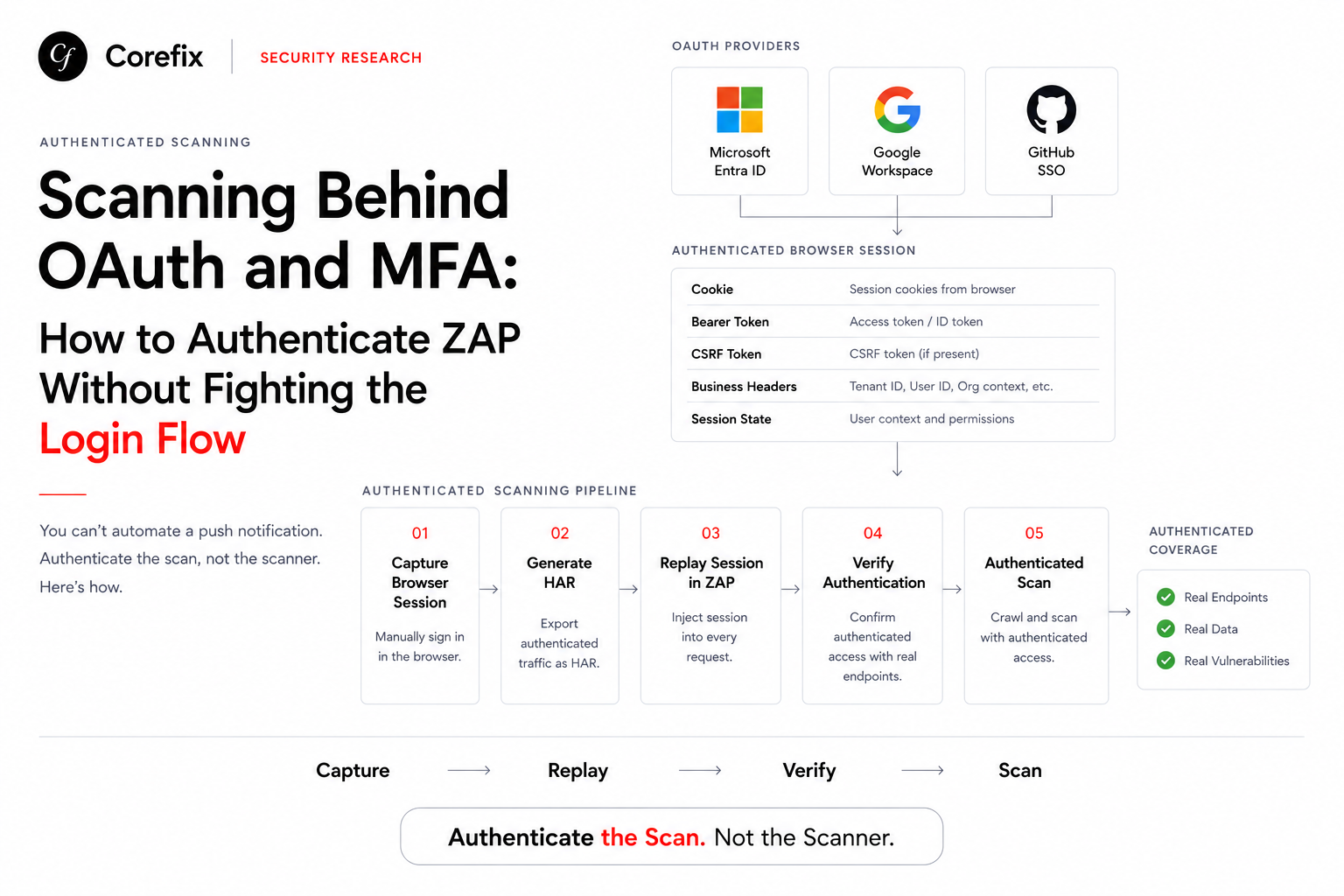

Modern applications increasingly sit behind Microsoft Entra ID, Google Workspace, or GitHub SSO — often with MFA enforced. That's great for security posture. It's also a wall for automated DAST scanning, because no scanner, ZAP included, can click through a push notification or type a TOTP code on your behalf.
The good news: you don't need to automate the login. You need to authenticate the scan, not the scanner. Here's how that works in practice, including a debugging session that taught us a few hard lessons worth sharing.
Skip the Login, Replay the Session
If ZAP can't drive OAuth+MFA, the answer isn't to force it to try. It's to let a human (or a tool like a browser extension capturing HAR traffic) complete the login once, capture everything that makes that session "authenticated," and inject it into every request ZAP makes — bypassing the login flow in ZAP's Automation Framework entirely.
Practically, this means:
- No
authentication:block in the ZAP context at all - A
scriptjob of typehttpsenderthat runs early in the plan and attaches the captured session to every outgoing request - ZAP's
sessionManagementand login-page config become irrelevant, since there's no login step for them to manage
This is a well-established pattern for exactly this scenario — session token replay — and it works. But what you capture and inject matters more than most people assume.
The Trap: "It's Just a Bearer Token" Is Often Wrong
The instinct is to grab the JWT or access token from the OAuth callback and set it as an Authorization: Bearer <token> header on every request. Often that's not enough — and the failure mode is silent, not loud.
We hit this directly while validating a scan against a test target. The token was fresh, the signature was valid, and the header was being injected correctly by our httpsender script — confirmed by checking ZAP's own script-load log. And yet an authenticated-only endpoint kept returning an empty, unauthenticated-looking response. No 401, no 403 — just a quiet 200 OK with hollow data, exactly as if no token had been sent at all.
The root cause: the application was reading its session from a cookie, not the Authorization header. The backend had two valid auth code paths, and the one we were feeding only covered one of them. The fix was simple once identified — inject the same token as both a Cookie header and an Authorization header:
function sendingRequest(msg, initiator, helper) {
    var token = "eyJ...";
    msg.getRequestHeader().setHeader("Authorization", "Bearer " + token);

    var existingCookie = msg.getRequestHeader().getHeader("Cookie");
    var tokenCookie = "token=" + token;
    if (existingCookie != null && existingCookie.length > 0) {
        msg.getRequestHeader().setHeader("Cookie", existingCookie + "; " + tokenCookie);
    } else {
        msg.getRequestHeader().setHeader("Cookie", tokenCookie);
    }
}
The lesson generalizes well beyond this one app: capture the entire authenticated session surface, not just the token. That means cookies, custom business headers (tenant IDs, user IDs, org context — the kind of static headers we've covered before), and any CSRF pairing the app expects. A single Bearer header is one possible auth vector among several an app might check, and you often can't know which one matters until you test it directly.
Why the requestor Job Isn't Optional — It's Your Canary
It's tempting to skip straight to spider and active scan once your header-injection script is wired up. Don't. A requestor job placed immediately after your injection script, hitting a real authenticated endpoint, is the cheapest insurance in the whole plan:
- name: verifyAuthHeaderInjection
  type: requestor
  parameters:
    user: zap-user
  requests:
    - url: http://target/rest/user/whoami
      method: GET
      responseCode: 200
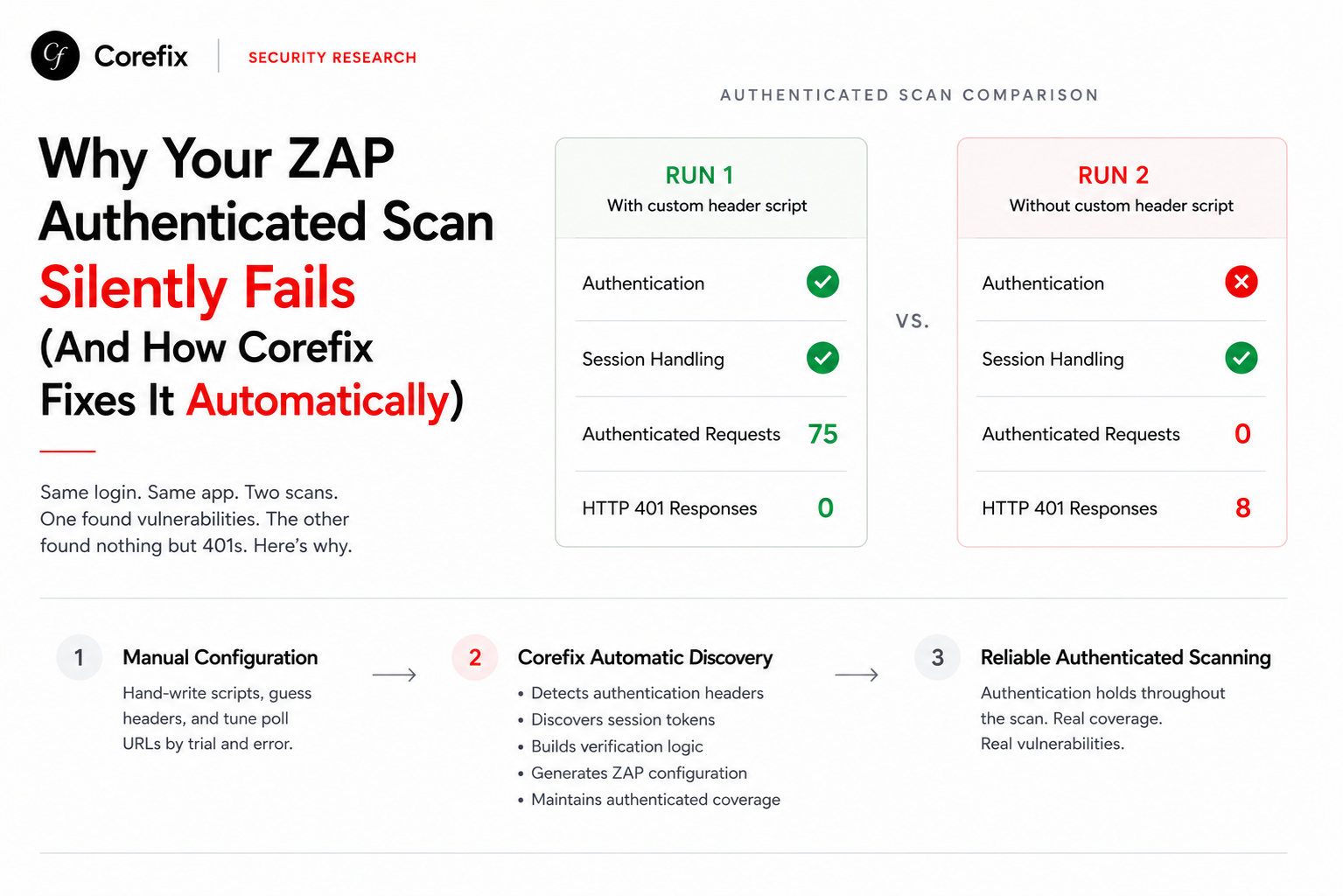
But here's the catch we ran into: a responseCode: 200 check alone can lie to you. Some endpoints return 200 OK regardless of authentication state — the only thing that changes is the body. We proved this by hitting the same endpoint in an incognito browser tab with zero session at all, and it returned the identical hollow shape as our "authenticated" scan run. The status code was never the signal; the body content was.
The fix is to inspect the response body, not just the status code, using the same httpsender script that injects your headers:
function responseReceived(msg, initiator, helper) {
    var uri = msg.getRequestHeader().getURI().toString();
    if (uri.indexOf("/rest/user/whoami") !== -1) {
        print("=== whoami check ===");
        print("Status: " + msg.getResponseHeader().getStatusCode());
        print("Body: " + msg.getResponseBody().toString());
    }
}
With progressToStdout: true set, this prints directly into your run log. A real authenticated response shows populated user fields; an unauthenticated one shows an empty object. That distinction is unambiguous in a way that status codes on this class of endpoint simply aren't.
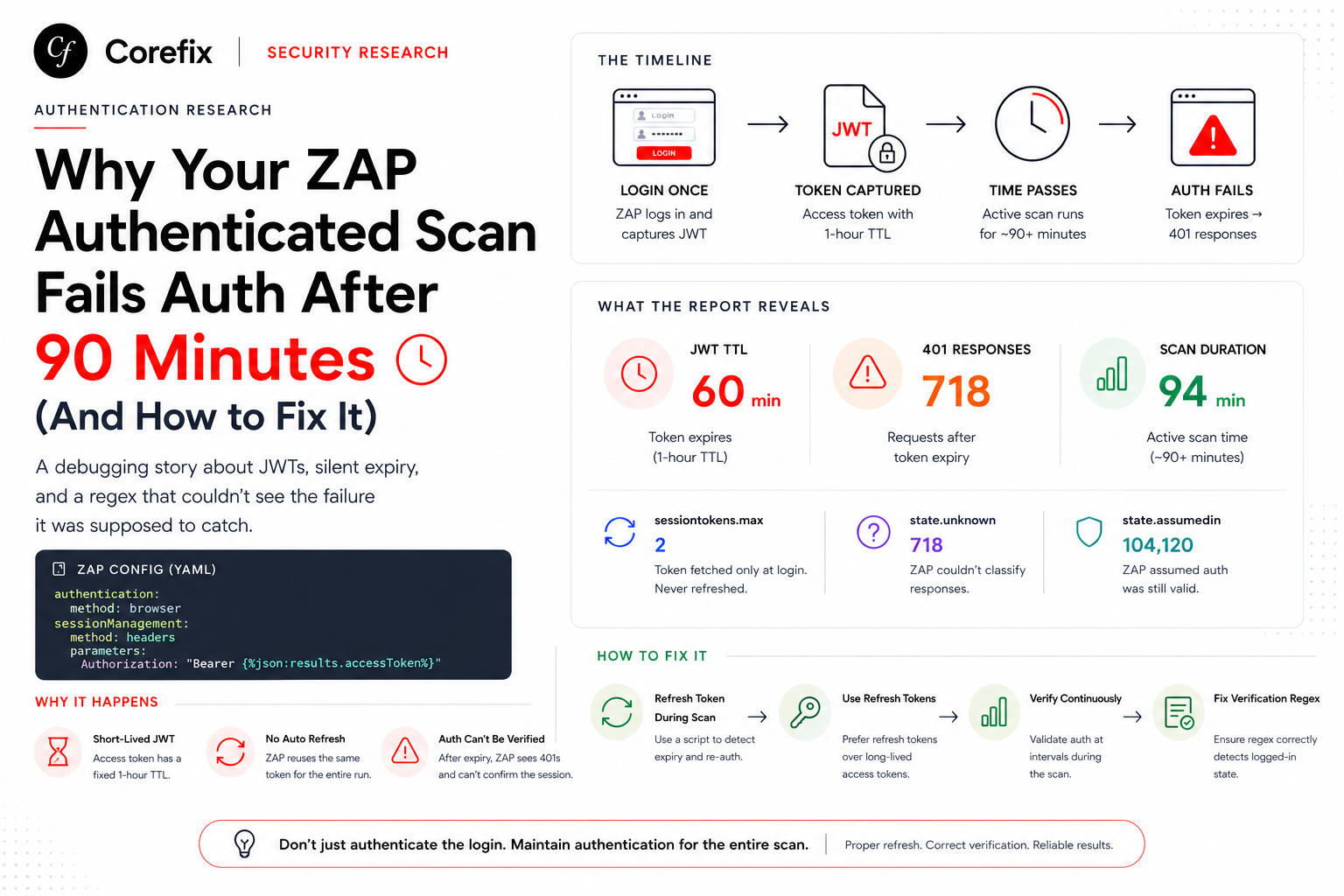
We took this further and left the same print statement active through spider, AJAX spider, and active scan — not just the initial verification step. That turned out to be essential: it caught the session staying authenticated deep into the scan, run after run, rather than just at the first request. A token that works at second zero and silently dies at minute ten produces a report that looks complete but scanned half the app as an anonymous stranger. Checking once at the start isn't enough; the requestor job plus body-level logging needs to function as a running canary across the whole plan.
Putting It Together: A Verification-First Pattern
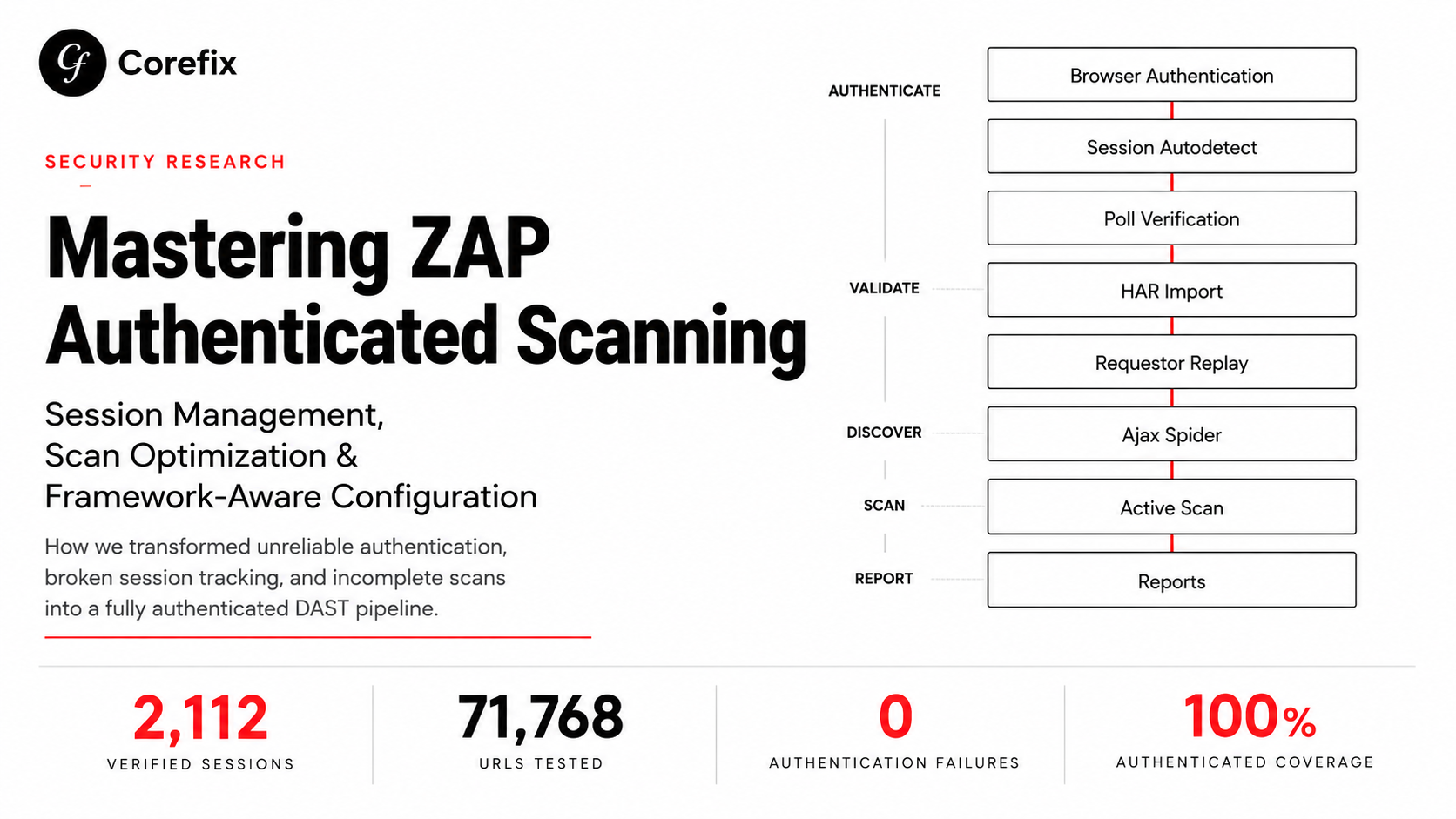
The pattern that emerged from this debugging process, and that we'd now recommend as a baseline for any OAuth/MFA-bypassed scan:
- Capture broadly. Don't assume the access token alone is sufficient — capture the full cookie jar and any custom headers present on a genuinely authenticated request.
- Inject broadly. Set the captured token (and session data) as both header and cookie, covering multiple possible auth code paths on the backend.
- Verify with content, not just status. A
requestorjob checkingresponseCode: 200is necessary but not sufficient — pair it with body-level inspection via yourhttpsenderscript. - Verify continuously, not once. Leave diagnostic logging active through the whole plan so a mid-scan session death shows up in the log instead of hiding inside a clean-looking report.
- Test the unauthenticated baseline yourself. Before trusting any endpoint as your verification target, hit it with zero credentials (curl, incognito) and confirm it actually behaves differently when authenticated. If it doesn't, pick a different endpoint.
Why This Matters for Every OAuth/MFA-Gated Scan
None of this is unique to one application. Any app with a login flow ZAP can't automate — Microsoft, Google, GitHub SSO, or a fully custom auth stack — pushes you into this same session-replay pattern, and the same traps apply everywhere: multiple valid auth vectors, misleading status codes, and sessions that quietly expire mid-scan. Skipping the verification and continuous-logging steps doesn't make the scan faster; it just moves the cost from "an hour of debugging up front" to "a security report nobody can fully trust after the fact."
Everything above is exactly what we had to do manually, step by step, with a live terminal and a lot of trial and error. That manual process is precisely what Corefix exists to eliminate.
How Corefix Abstracts All of This Away
Corefix sits as a layer on top of ZAP's Automation Framework, and its job is to do everything described in this post automatically — capture, injection, verification, and continuous monitoring — without a security engineer hand-writing scripts or staring at stdout logs looking for {"user":{}}.
1. Capture, driven by a real browser, not a guess. Instead of asking someone to manually pull a token out of DevTools, Corefix drives an actual Playwright session through the real OAuth/MFA login flow — the human completes the push approval or TOTP step once, and Corefix watches the entire resulting network traffic. It doesn't grab just the access token; it captures the full authenticated session surface: cookies, Authorization headers, CSRF pairings, and any static business headers the backend expects. This is the "capture broadly" step from above, done automatically instead of by hand.
2. Injection across every vector, not just one. We only discovered the cookie-vs-header issue because we happened to test both manually with curl. Corefix doesn't rely on guessing which vector the backend checks — it generates the httpsender script to inject all discovered session artifacts (headers and cookies together) into every request ZAP makes, exactly like the fixed script in this post, but without anyone needing to diagnose the mismatch first.
3. A verification job that checks content, automatically. Corefix doesn't trust responseCode: 200 as a proxy for "logged in." It identifies a genuinely auth-gated endpoint from the captured traffic — one that demonstrably behaves differently authenticated vs. not — and builds the requestor job and body-inspection logic around that endpoint automatically, the same way we had to hand-verify by testing /rest/user/whoami in incognito first.
4. Continuous session health, not a one-time check. Because Corefix generates the same print-and-inspect pattern we added to responseReceived, it can watch authentication state throughout the entire plan — spider, AJAX spider, and active scan — and surface a clear signal the moment a session degrades mid-run, instead of letting a scan complete and quietly report on half-anonymous traffic.
5. One config, handed straight to ZAP. The end result is a complete ZAP Automation Framework plan — context, scripts, verification jobs, and all — generated and handed to ZAP to execute. The scanning engine underneath is still the same trusted, open-source ZAP; Corefix just removes the hours of manual discovery, scripting, and debugging that normally sit between "we have OAuth with MFA" and "we have a working authenticated scan."
The pattern in this post — capture broadly, inject broadly, verify with content, verify continuously — is the right way to do this by hand. Corefix's job is to make sure no one has to do it by hand more than once.