

How we went from broken session tokens and missed vulnerabilities to a fully authenticated, optimized DAST pipeline — and every lesson learned along the way.
Introduction
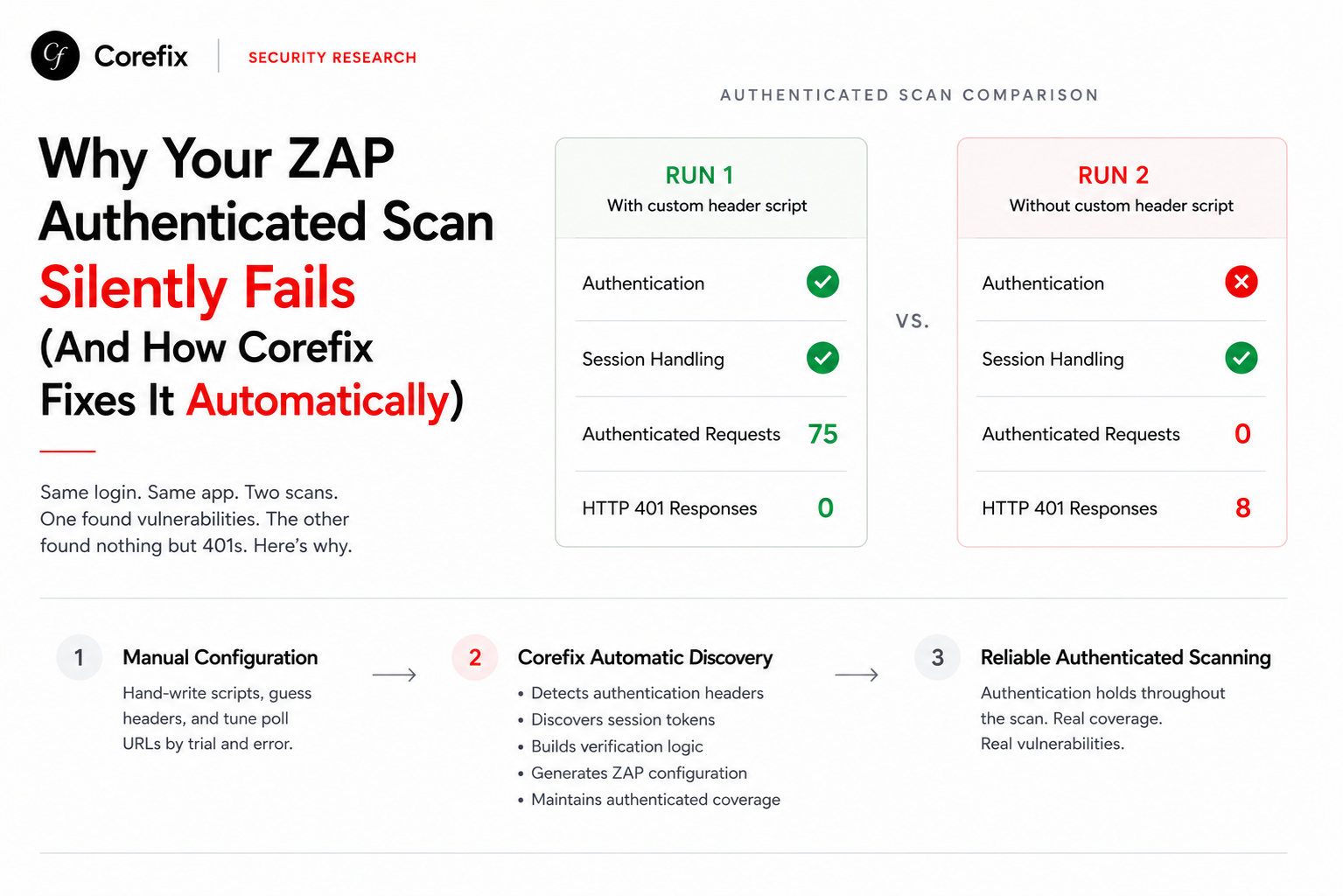
OWASP ZAP is a powerful open-source DAST (Dynamic Application Security Testing) tool, but getting authenticated scanning right — especially against modern JavaScript-heavy applications built with Next.js, React, Vue, or similar frameworks — is notoriously difficult. Authentication might appear to work while the session silently dies mid-scan, producing results that look comprehensive but only tested unauthenticated surfaces.
This post documents a real-world journey of configuring ZAP's automation framework for authenticated scanning across two structurally different applications: a Next.js + NextAuth cookie-session app and a JWT-based SPA (OWASP Juice Shop). We cover authentication methods, session management strategies, verification tuning, framework header handling, scan policy optimization, and job ordering — with before/after data from actual scan reports.
The Authentication Problem
ZAP offers several authentication methods — form-based, JSON-based, browser-based — and multiple session management strategies. Picking the wrong combination, or misconfiguring any piece, leads to a scan that thinks it's authenticated but is actually testing as an anonymous user.
How to Tell If Authentication Is Really Working
ZAP's auth report statistics are the ground truth. These are the key fields to check:
stats.auth.state.loggedin — The number of times ZAP's poll verification confirmed the session was alive by matching the loggedInRegex against the poll URL's response. This is the gold standard. If this number is zero or absent, your scan is not reliably authenticated, regardless of what the summary says.
stats.auth.state.assumedin — Requests where ZAP assumed the session was valid without re-checking. A high ratio of assumedin to loggedin is normal (ZAP can't poll on every request), but loggedin should still be a meaningful number — at least dozens for a multi-minute scan.
stats.auth.state.unknown — Requests where ZAP's poll check matched neither the logged-in nor the logged-out regex. Any nonzero value here means your verification regexes don't fully cover the poll endpoint's possible responses. Investigate immediately.
stats.auth.failure and stats.auth.browser.failed — These should be absent. If present, authentication attempts are failing, likely due to timing issues or form field detection problems.
Here's what a healthy vs unhealthy auth report looks like:
| Stat | Broken Run | Healthy Run |
|---|---|---|
auth.state.loggedin | absent | 2,112 |
auth.state.unknown | 25 | absent |
auth.state.assumedin | 1,012 | 72,647 |
auth.failure | ✗ | absent |
| Session token tracked | absent | 4,273 |
Browser Auth + Autodetect: The Winning Combination
After testing multiple configurations, we settled on a combination that works reliably across both cookie-session and JWT-based applications.
Authentication Method: Browser
The browser method launches a real headless Firefox instance, navigates to the login page, and lets ZAP's form detection fill in credentials. This handles JavaScript-rendered login forms, CSRF tokens, multi-step flows, and cookie-setting redirects automatically — things that the form and json methods struggle with.
authentication:
  method: browser
  parameters:
    browserId: firefox-headless
    loginPageWait: 30          # Give SPAs time to fully render
    loginPageUrl: https://example.com/auth/signin
The loginPageWait: 30 is important for SPAs — the login form might not be in the DOM immediately. We tested with 5 seconds and saw intermittent browser.nopasswordfield / browser.nouserfield failures. At 30 seconds, ZAP reliably finds the form fields every time.
Session Management: Autodetect
Rather than manually templating session headers (which is fragile and error-prone), let ZAP figure out which cookies or tokens carry the session.
sessionManagement:
  method: autodetect
In our first attempt, we hand-crafted the session header:
sessionManagement:
  method: headers
  parameters:
    Cookie: "__Secure-next-auth.callback-url=...; __Secure-next-auth.session-token={%cookie:__Secure-next-auth.session-token%}"
    next-url: /auth/signin
    rsc: 1
    next-router-state-tree: <VALUE>
This caused two problems. First, next-router-state-tree: <VALUE> was a literal string placeholder, not a real value — Next.js either ignored it or returned malformed responses. Second, ZAP's own session token bookkeeping never tracked the session cookie because we'd bypassed its detection mechanism. The result: auth.state.loggedin was absent (ZAP never confirmed the session was alive), and the __Secure-next-auth.session-token cookie didn't appear in the session token stats at all.
Switching to autodetect resolved both issues immediately. ZAP discovered the session cookie on its own, tracked it across the scan, and auth.state.loggedin jumped from zero to 636 on the first clean run.
Verification: Explicit Poll Configuration
Verification is how ZAP confirms the session is still alive during a scan. The poll method hits a URL at regular intervals and checks the response against regexes.
verification:
  method: poll
  loggedInRegex: '"email":"user@example\.com"'
  loggedOutRegex: Please check your password or email\.
  pollFrequency: 10
  pollUnits: seconds
  pollUrl: https://example.com/api/auth/session
Never use method: autodetect for verification. When we did, ZAP picked a random API endpoint (/api/proxy/agent-approve/...) and matched on HTTP status codes (200 OK / 401 Unauthorized). Any endpoint returns 200 when the server is up — this doesn't prove authentication. The poll frequency also defaulted to 60 seconds instead of 10, reducing verification checks from ~180 to just 5 across a scan.
Always use a JSON API endpoint (session endpoint, whoami endpoint) that returns user-specific data in the response body, and match on a stable identifying field like the user's email or role.
Always have a fallback if your LLM-based config generator fails to return a pollUrl:
const verification = llmResult.pollUrl
  ? {
      method: "poll",
      loggedInRegex: llmResult.loginRegex,
      loggedOutRegex: llmResult.loggedOutRegex,
      pollFrequency: 10,
      pollUnits: "seconds",
      pollUrl: llmResult.pollUrl,
    }
  : {
      method: "poll",
      loggedInRegex: `\\Q${credentials.username}\\E`,
      loggedOutRegex: "Unauthorized|Invalid|Sign in",
      pollFrequency: 10,
      pollUnits: "seconds",
      pollUrl: customConfig.authentication.loginBackendUrl || loginPageUrl,
    };
Handling Custom Headers: Separating Auth from Business Logic
Modern web apps often include non-standard headers in authenticated requests — things like X-Tenant-ID, X-Organization, X-Api-Version. These get picked up during traffic analysis and need to be injected into scan requests.
But there's a critical distinction: auth headers (Authorization, Cookie) should be managed by ZAP's autodetect, while business headers should be injected via an httpsender script. Mixing them causes conflicts.
The Problem: LLM-Generated Header Injection
We use an LLM to analyze authenticated traffic and generate ZAP configuration. The LLM prompt asks it to identify custom headers the client sends. The problem: the LLM also picks up framework-internal headers like next-router-state-tree, rsc, and next-url — and since their values are dynamic, it returns <VALUE> as a placeholder. This literal string then gets injected on every request via the httpsender script, causing the ajax spider's browser to conflict with the injected headers.
The Fix: Filter Before Injection
Filter out auth headers and framework headers before generating the injection script:
const authPatterns = /^(authorization|cookie|set-cookie)$/i;

const frameworkPatterns = new RegExp(
  "^(" + [
    // Next.js
    "next-router-state-tree", "next-router-prefetch",
    "next-router-segment-prefetch", "next-url", "next-action",
    "rsc", "x-nextjs-.*",
    // Remix / React Router v7
    "x-remix-.*",
    // SvelteKit
    "x-sveltekit-.*",
    // Nuxt.js
    "x-nuxt-.*",
    // htmx
    "hx-request", "hx-boosted", "hx-current-url",
    "hx-history-restore-request", "hx-prompt",
    "hx-target", "hx-trigger", "hx-trigger-name",
    // Hotwire / Turbo
    "turbo-frame", "turbo-stream", "x-turbo-request-id",
    // Server response headers (not client-sent)
    "x-powered-by", "x-request-id", "x-correlation-id",
    "x-vercel-.*", "x-middleware-.*", "cf-.*", "server-timing",
  ].join("|") + ")$", "i"
);

const businessHeaders = Object.entries(customConfig.headers || {})
  .filter(([key]) => !authPatterns.test(key) && !frameworkPatterns.test(key));
Only generate the httpsender script if businessHeaders.length > 0. The script should inject only those filtered headers.
Impact on Ajax Spider and DOM XSS
Injecting next-router-state-tree: <VALUE> had a measurable negative impact. The ajax spider uses a real browser — injecting a malformed framework header into its requests caused the browser's native routing state and the injected header to conflict. In one run, the ajax spider found only 21 URLs (vs 1,707 without the injection), and DOM XSS scanning didn't fire at all because it's tied to the ajax spider's discovery.
After removing the framework header injection, the ajax spider resumed normal behavior and DOM XSS scanning returned (454 scans, 12,652 DOM gets).
Job Ordering: Maximizing Discovery and Coverage
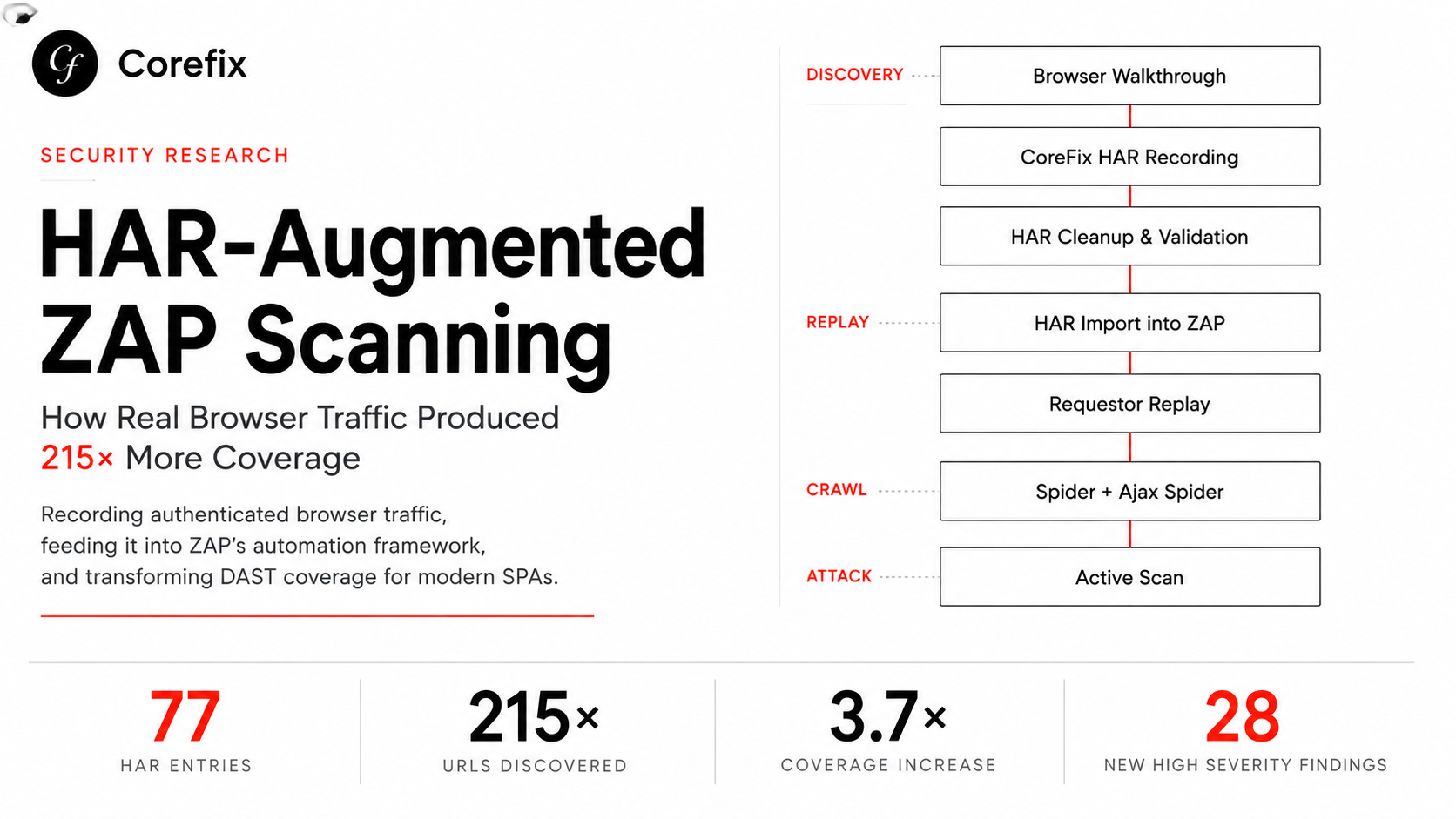
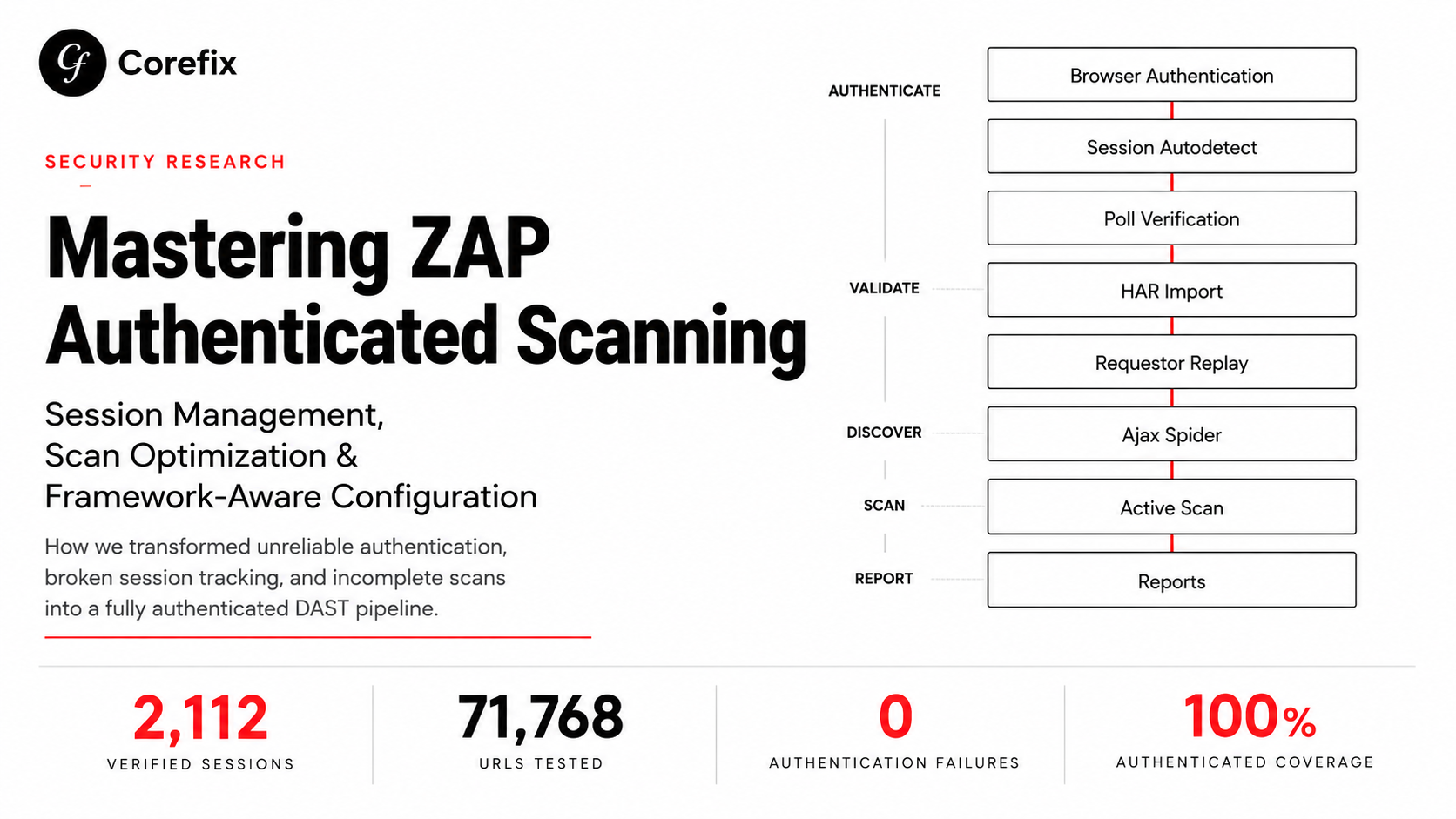
The order of jobs in ZAP's automation framework has a direct impact on scan coverage. After extensive testing, here's the optimal order:
jobs:
  # 1. Scripts (ACSRF, business headers)
  - type: script  # ACSRF token registration
  - type: script  # Business header injection (if any)

  # 2. Ajax Spider FIRST — empty sites tree = max discovery + DOM XSS
  - type: spiderAjax
    parameters:
      maxDuration: 12

  # 3. HAR Imports — seed real API traffic the browser can't reach
  - type: import
    parameters:
      type: har
      fileName: /zap/wrk/chunk-0.har

  # 4. Requestor — ensure critical authenticated endpoints are tested
  - type: requestor

  # 5. CSRF handling scripts (for traditional spider + active scan)
  - type: script  # XSRF token handler
  - type: script  # Anti-CSRF form field registration

  # 6. Traditional Spider — parse everything for additional links
  - type: spider
    parameters:
      maxDuration: 12

  # 7. Active Scan
  - type: activeScan

  # 8. Wait for passive scanning to complete
  - type: passiveScan-wait

  # 9. Passive scan config (auth diagnostic rules only — AFTER wait)
  - type: passiveScan-config

  # 10. Reports
  - type: report
Why This Order Matters
Ajax spider first: When the sites tree is empty, the ajax spider discovers URLs by clicking through the entire UI in a real browser. If HAR imports run first, most URLs are already known, and the ajax spider finds almost nothing (22 URLs vs 1,707). More critically, DOM XSS scanning runs during the ajax spider phase — with an empty sites tree, the DOM XSS scanner launches browser instances to test each newly discovered page (454 scans). With a pre-populated tree, it doesn't launch at all.
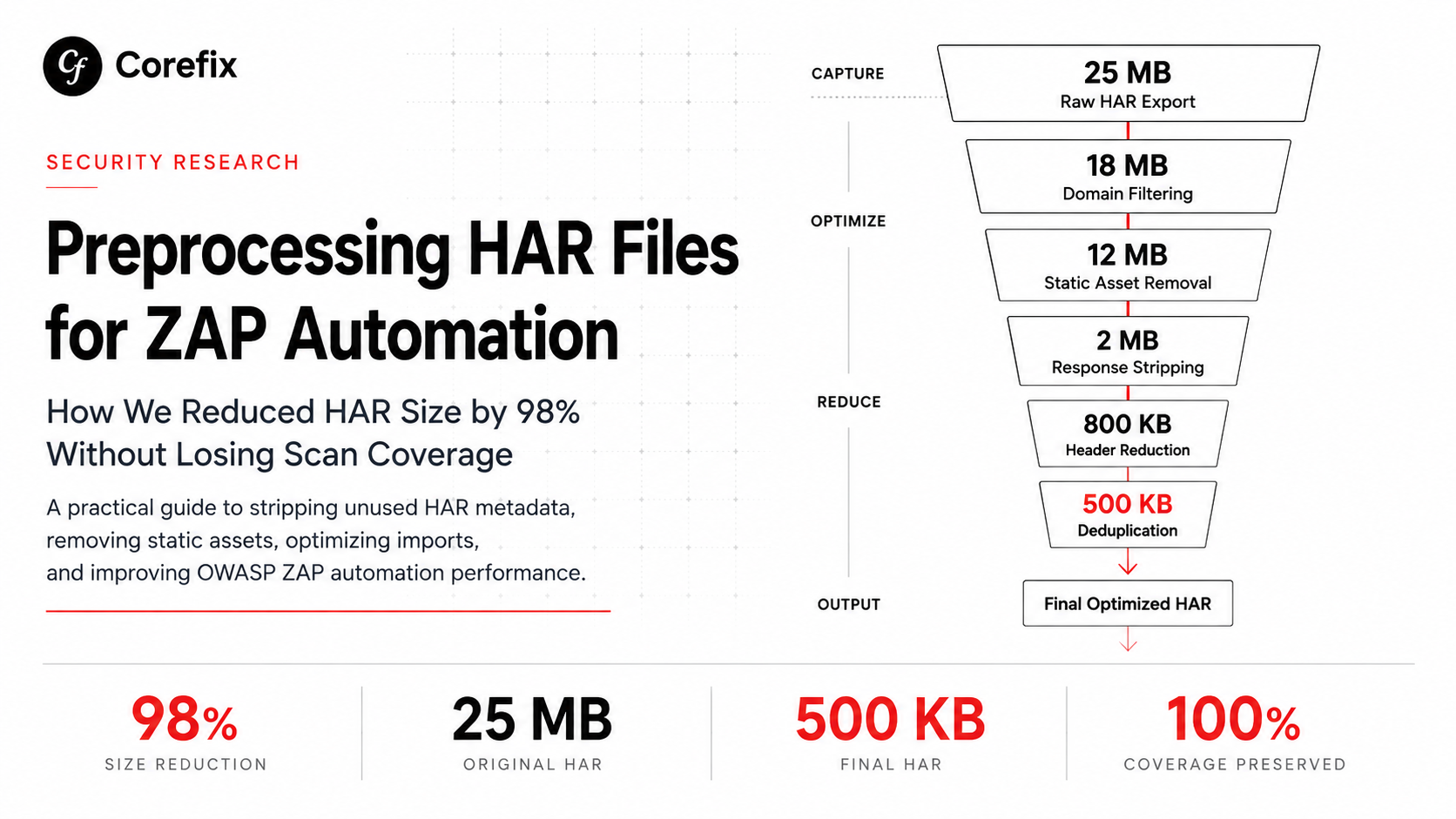
HAR imports after ajax spider: HAR files contain real authenticated API traffic with exact parameters, query strings, and request bodies that no spider will ever construct on its own (e.g., /api/proxy/projects/5a47706852413d3d/risk-info?category=&status=&page_size=25&page=1&search=). They complement the spider's UI-level discovery with API-level coverage.
passiveScan-config after passiveScan-wait: This is critical. If passiveScan-config runs first with disableAllRules: true, all passive scan rules are turned off during the entire scan. Moving it after passiveScan-wait ensures all ~80 passive rules run during scanning (finding missing security headers, cookie issues, information disclosure, etc.), and the config change only takes effect afterward for the auth diagnostic report.
Scan Policy Optimization: Balancing Depth and Breadth
The Time Budget Problem
ZAP's active scan rules run sequentially. Each rule tests every URL in the sites tree with its configured strength. At defaultStrength: high, a typical rule sends 2-3x more payloads per URL than at medium. Combined with a large URL set (from HAR imports), this means each rule takes significantly longer.
In our testing:
| Config | Strength | Rules Completed | Scan Time | URLs Tested |
|---|---|---|---|---|
| std-default | medium | ~60 | 49 min | 78,072 |
| All high + 8 insane | high | ~14 | 60 min | 59,547 |
| Default medium + 8 high | medium | ~20 | 75 min | 71,768 |
Setting defaultStrength: high caused every rule to take 3-5x longer, so only 14 of ~60 rules completed before the scan time cap. The remaining ~46 rules were queued but never executed — including CSRF testing, LDAP injection, command injection, SSRF, and XXE.
The Optimal Policy
Keep most rules at medium (fast), boost only critical rules to high:
policyDefinition:
  defaultStrength: medium
  defaultThreshold: medium
  rules:
    - { id: 40018, strength: high, threshold: low }   # SQL Injection
    - { id: 40019, strength: high, threshold: low }   # SQL Injection (MySQL)
    - { id: 40012, strength: high, threshold: low }   # XSS (Reflected)
    - { id: 40026, strength: high, threshold: low }   # XSS (DOM)
    - { id: 90018, strength: high, threshold: low }   # Advanced SQL Injection
    - { id: 6,     strength: high, threshold: low }   # Path Traversal
    - { id: 90020, strength: high, threshold: low }   # Remote OS Command Injection
    - { id: 90037, strength: high, threshold: low }   # SSTI
Never use insane strength — it sends exponentially more payloads with diminishing returns and can consume the entire scan budget on a single rule.
Scan Tier Configuration
Scale scan parameters based on the desired coverage level:
const ScanTiers = {
  quick: {
    maxDepth: 5,
    maxChildren: 25,
    maxRuleDurationInMins: 2,
    maxScanDurationInMins: 10,
    maxAlertsPerRule: 5,
    maxSpiderDuration: 2,
  },
  normal: {
    maxDepth: 10,
    maxChildren: 50,
    maxRuleDurationInMins: 5,
    maxScanDurationInMins: 20,
    maxAlertsPerRule: 5,
    maxSpiderDuration: 5,
  },
  moderate: {
    maxDepth: 10,
    maxChildren: 50,
    maxRuleDurationInMins: 5,
    maxScanDurationInMins: 40,
    maxAlertsPerRule: 10,
    maxSpiderDuration: 7,
  },
  high: {
    maxDepth: 20,
    maxChildren: 75,
    maxRuleDurationInMins: 8,
    maxScanDurationInMins: 75,
    maxAlertsPerRule: 10,
    maxSpiderDuration: 12,
  },
  veryHigh: {
    maxDepth: 25,
    maxChildren: 100,
    maxRuleDurationInMins: 10,
    maxScanDurationInMins: 120,
    maxAlertsPerRule: 15,
    maxSpiderDuration: 15,
  },
};
Key tuning parameters:
maxRuleDurationInMins: Caps how long any single rule can run. Without this, a greedy rule like Path Traversal can consume 15+ minutes sending 17,000+ messages while finding the same 7 vulnerabilities it found in the first 2 minutes.
maxAlertsPerRule: Once a rule finds this many alerts, it stops. 10 is sufficient to prove a vulnerability class exists; 50 just wastes time re-confirming the same finding on different URLs.
maxScanDurationInMins: The overall cap. Set this higher than maxRuleDurationInMins × number_of_boosted_rules to ensure all rules get a turn.
Known ZAP 2.17 Issues
VariantMultipartFormParameters IndexOutOfBoundsException
Multiple active scan rules crash with IndexOutOfBoundsException: Index -1 out of bounds for length 1 at VariantMultipartFormParameters.setParameter when they encounter certain multipart form parameter structures. Affected rules include XSS, Path Traversal, External Redirect, SSI, ShellShock, and SQL Injection timing variants. Each rule recovers and continues scanning other URLs, so the impact is limited to losing coverage on that specific request per rule.
Tech Detection Passive Scanner Performance
The Tech Detection passive scan rule can take 30-55 seconds to process large JavaScript bundles (100KB+). This produces warnings in the log but doesn't affect scan results.
Summary: The Final Configuration Checklist
- Auth method:
browserwithloginPageWait: 30 - Session management:
autodetect(never hand-craft session headers) - Verification:
pollwith a JSON API endpoint, body-content regex, 10-second frequency (neverautodetect) - Custom headers: Filter out
authorization,cookie, and all framework headers; only inject genuine business headers - Job order: Ajax spider → HAR imports → Requestor → CSRF scripts → Traditional spider → Active scan → Passive scan wait → Config → Reports
- Scan policy:
defaultStrength: mediumwith selectivehighon 8 critical rules - Time caps:
maxRuleDurationInMins: 5-10,maxAlertsPerRule: 10-15, total scan time proportional to rule count - Passive scan: Keep all rules enabled during scanning; move
passiveScan-configafterpassiveScan-wait
With this configuration, we achieved 2,112 confirmed authenticated verification checks across a 75-minute scan testing 71,768 URL/rule combinations, with zero authentication failures, zero unknown auth states, and full passive scan and DOM XSS coverage.