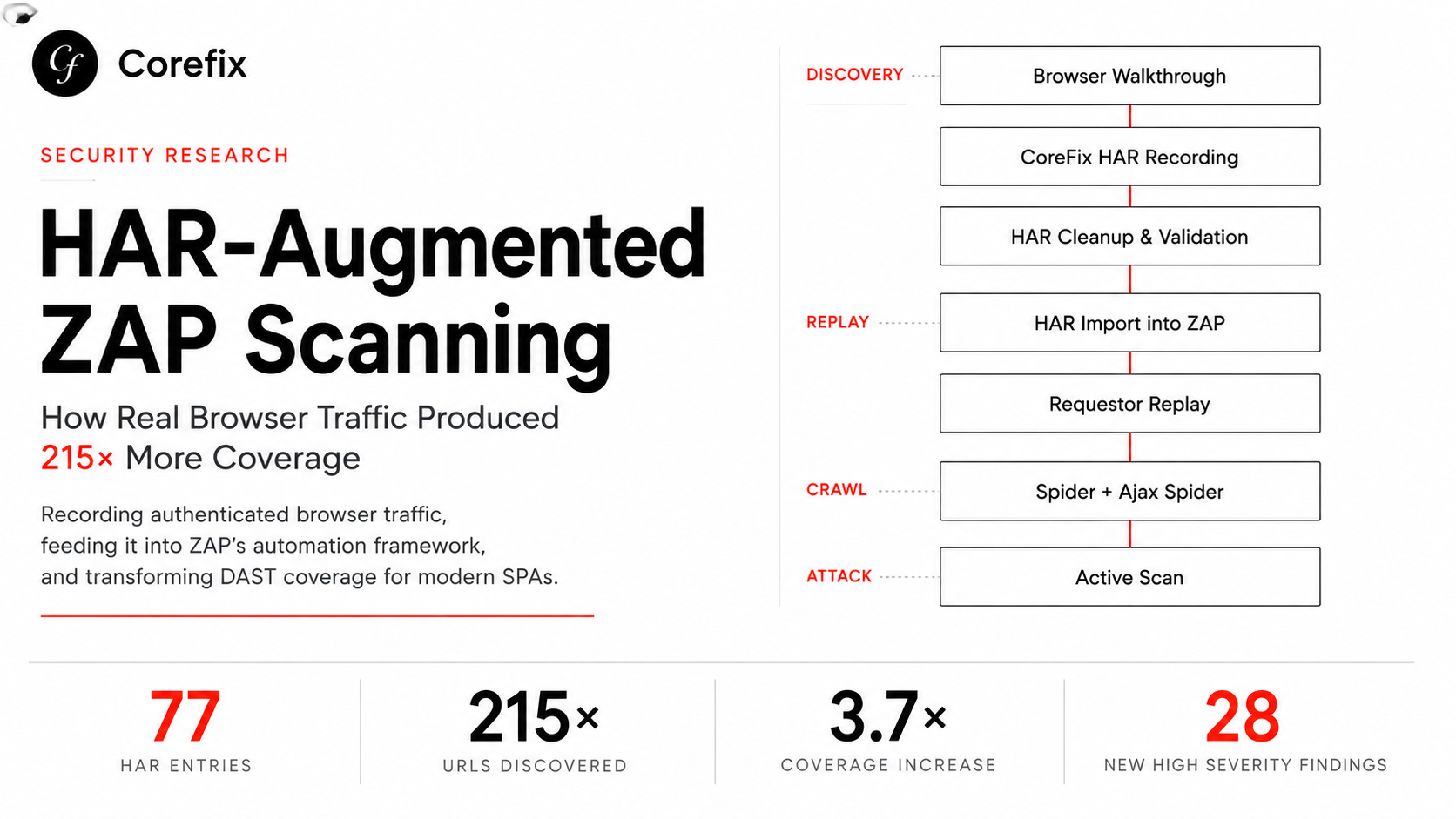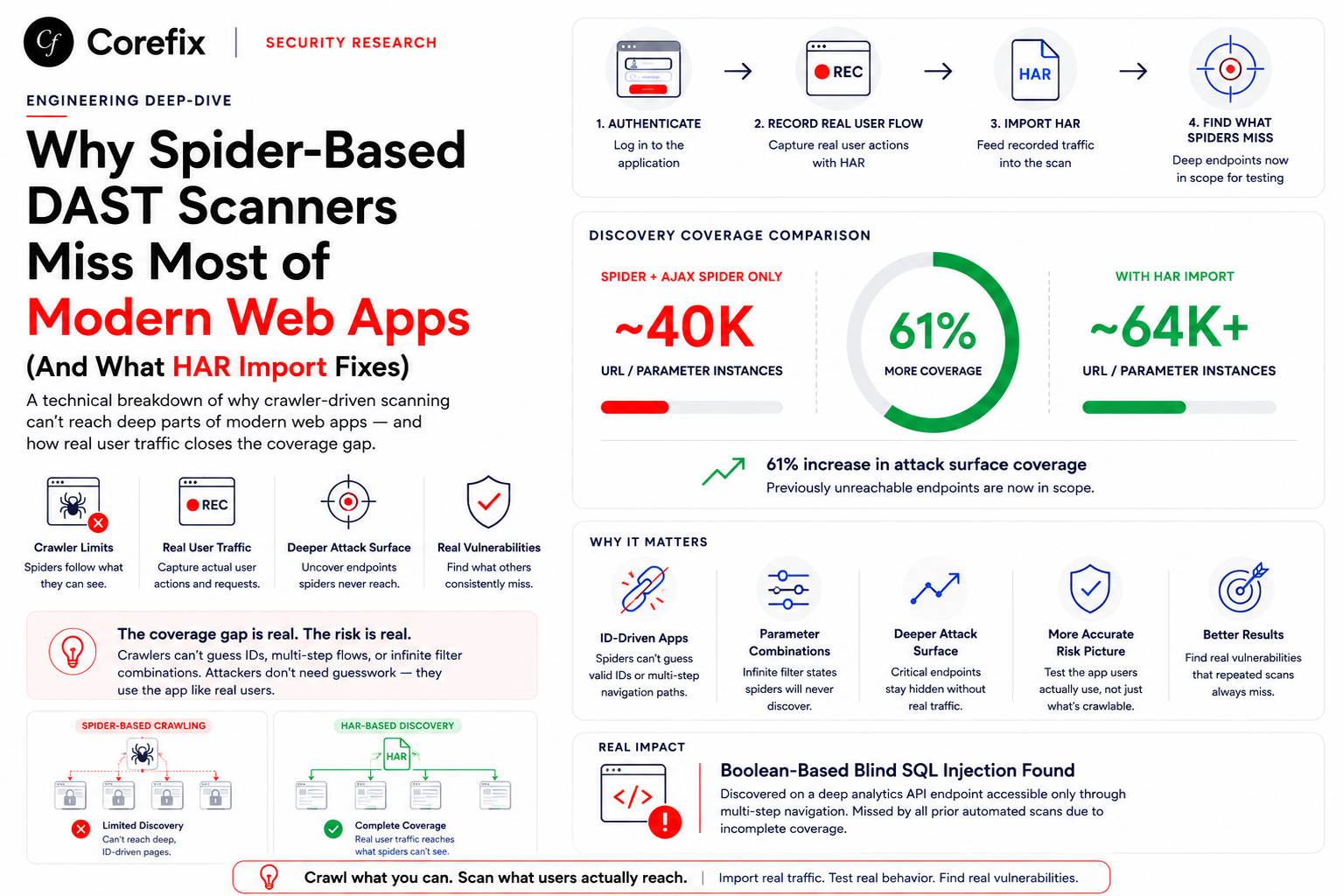

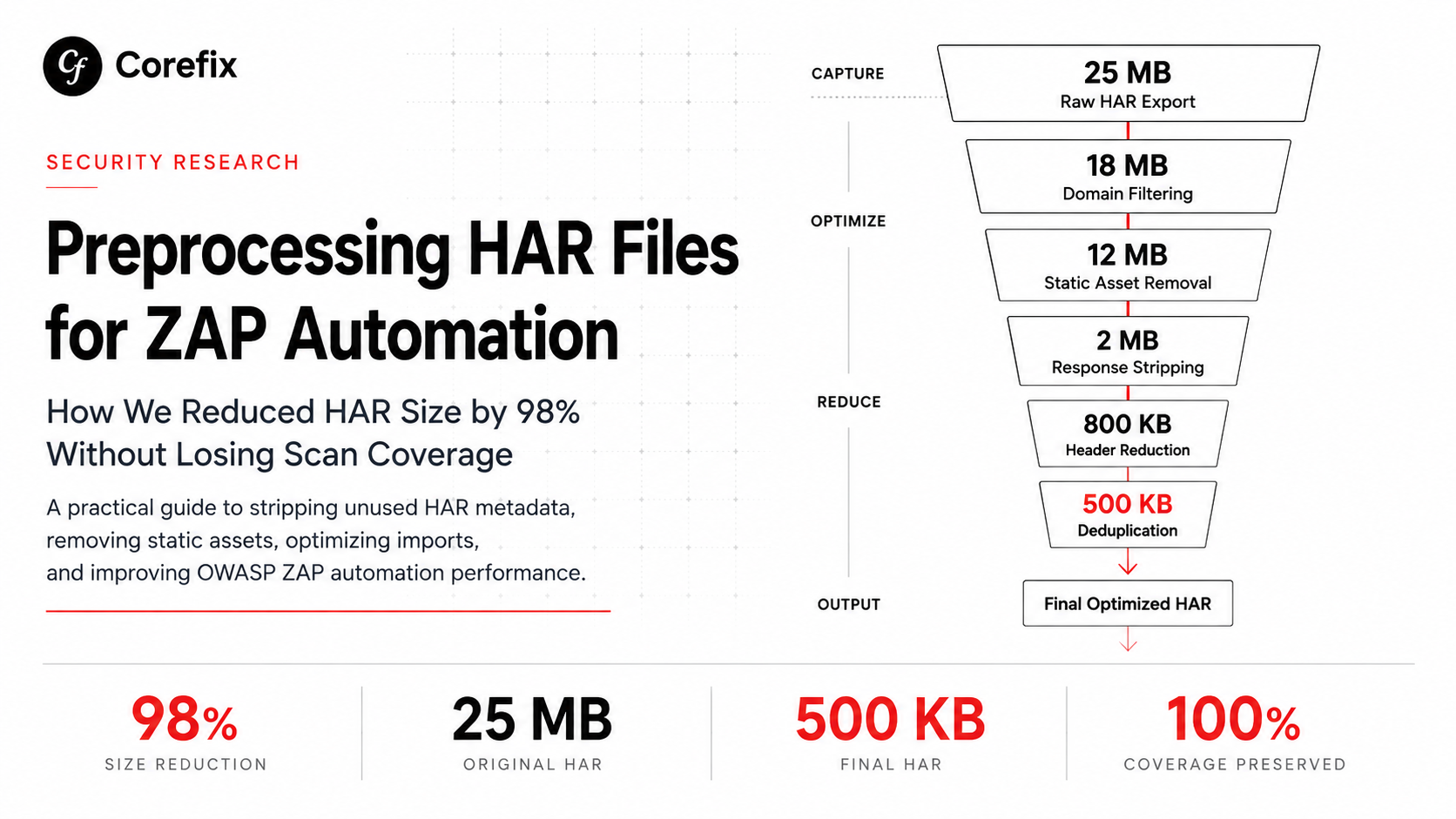

TL;DR — HAR files captured from browser traffic can easily exceed 25 MB, but ZAP's HAR import only reads log.entries[].request and log.entries[].response. Everything else — pages, initiator stacks, timings, custom fields — is ignored. By stripping what ZAP doesn't use, you can reduce a 25 MB HAR to ~500 KB with zero loss of scan coverage.
The Problem
If you're integrating browser-recorded traffic into OWASP ZAP's Automation Framework, you've probably hit the size wall. A single user session captured as HAR from Chrome DevTools or a browser extension can produce files of 25 MB or more. Most of that bulk comes from fields ZAP never reads: JavaScript call stacks in _initiator, full response bodies, Chrome-specific metadata, timing breakdowns, and duplicated requests to static assets.
This document covers what you can safely strip, what you must keep, and the edge cases to watch for — verified against ZAP's actual source code.
How ZAP Imports HAR Files
ZAP's HAR import lives in the exim (Import/Export) add-on. The import pipeline is straightforward:
HarReader.readFromFile(file)
    → HarLog.entries()
        → stream/filter/map
            → HarUtils.createHttpMessage(entry)
                → persist to Sites Tree + History
The current implementation (as of zap-extensions main branch) uses the de.sstoehr.harreader library, which deserializes HAR JSON via Jackson with FAIL_ON_UNKNOWN_PROPERTIES=false. This means unknown or custom fields are silently ignored — they won't cause parse errors.
The key method chain in HarImporter.java:
private static List<HarEntry> preProcessHarEntries(HarLog log) {
    return log.entries().stream()
        .filter(HarImporter::entryIsNotLocalPrivate)
        .map(HarImporter::correctHttpVersions)
        .filter(HarImporter::entryHasUsableHttpVersion)
        .toList();
}
ZAP calls log.entries() — never log.pages(), log.creator(), log.browser(), or log.version(). The entries stream is filtered (skip about:, chrome:, edge: URLs), HTTP versions are corrected, and each entry is converted to an HttpMessage via HarUtils.createHttpMessage().
Source reference: HarImporter.java on GitHub
What ZAP Reads vs. Ignores
Fields ZAP actively uses
These are consumed by HarUtils.createHttpMessage() to reconstruct HTTP messages:
| Field Path | Used For |
|---|---|
request.method | HTTP method (GET, POST, etc.) |
request.url | Target URL — populates ZAP's Sites Tree |
request.httpVersion | Protocol version for the request line |
request.headers[] | Request headers — used by active and passive scanners |
request.postData.text | Request body for POST/PUT/PATCH |
request.postData.mimeType | Content type of request body |
request.queryString[] | URL parameters (also parsed from URL) |
request.cookies[] | Request cookies |
response.status | HTTP status code |
response.statusText | Reason phrase (e.g., "OK", "Not Found") |
response.httpVersion | Protocol version for the status line |
response.headers[] | Response headers — passive scanners analyze these |
response.content.text | Response body — passive scanners analyze this |
response.content.mimeType | Content type of response |
response.cookies[] | Response cookies |
response.redirectURL | Redirect target |
Fields ZAP ignores
| Field | Why It Exists | Safe to Remove? |
|---|---|---|
_initiator | Chrome DevTools: JS call stack that triggered the request | Yes |
_priority | Chrome DevTools: network priority (High/Low) | Yes |
_resourceType | Chrome DevTools: resource classification (xhr, script, etc.) | Yes |
_transferSize | Compressed transfer size on the wire | Yes |
_connectionId | Chrome's internal connection identifier | Yes |
serverIPAddress | Resolved IP of the server | Yes |
connection | Connection ID string | Yes |
timings | Request phase breakdown (DNS, SSL, wait, etc.) | Yes |
cache | Cache state before/after the request | Yes |
time | Total elapsed time in ms | Yes |
pageref | Links entry to a page in log.pages[] | Yes |
_deeptraq | Custom extension metadata (or any _-prefixed field) | Yes |
log.pages[] | Page-level metadata (titles, page timings) | Content ignored; keep "pages": [] for schema validity |
log.creator | Tool that generated the HAR | Ignored by importer |
log.browser | Browser name/version | Ignored by importer |
log.version | HAR spec version | Ignored by importer |
The pages array — keep the key, clear the content
The HAR 1.2 spec lists pages as optional. ZAP's importer never calls log.pages(). However, keeping "pages": [] rather than removing the key entirely is safer for schema validation and compatibility with other tools that might process the same HAR.
Preprocessing Script
The following jq-based script strips everything ZAP doesn't need. It handles domain filtering, static asset exclusion, response removal, header reduction, and deduplication.
const jqScript = `
# 1. Filter to target domain(s) only
.log.entries |= map(select(
  .request.url | (${domainFilter})
))

# 2. Exclude static assets, bundled JS, analytics, and third-party trackers
| .log.entries |= map(select(
  .request.url
  | test("\\\\.(png|jpg|jpeg|css|js|woff2?|svg|ico|gif|ttf|eot)$
         |polyfills
         |runtime\\\\.
         |main\\\\.
         |vendor\\\\.
         |chunk\\\\.
         |bundle\\\\.
         |assets/
         |static/
         |cdn\\\\.
         |fonts\\\\.
         |analytics
         |googletagmanager
         |hotjar
         |intercom
         |segment\\\\.io
         |sentry\\\\.io
         |clarity\\\\.ms
         |facebook\\\\.com
         |twitter\\\\.com
         |linkedin\\\\.com"; "ix")
  | not
))

# 3. Strip full response objects (ZAP active scanner generates its own)
| del(.log.entries[].response)

# 4. Remove all non-essential entry-level fields
| .log.entries[] |= del(
  .timings,
  .cache,
  .serverIPAddress,
  ._connectionId,
  ._initiator,
  ._priority,
  .time,
  .pageref
)

# 5. Keep only Content-Type and Accept headers (minimal for ZAP)
| .log.entries[].request.headers |= map(select(
  (.name | ascii_downcase) == "content-type"
  or (.name | ascii_downcase) == "accept"
))

# 6. Deduplicate by method + base URL (without query params)
| .log.entries |= (
  sort_by(.request.method + (.request.url | split("?")[0]))
  | group_by(.request.method + (.request.url | split("?")[0]))
  | map(.[0])
)

# 7. Add stub responses (ZAP requires response objects to exist)
| .log.entries[] |= if .response == null then . + {
    "response": {
      "status": 200,
      "statusText": "OK",
      "httpVersion": "HTTP/1.1",
      "headers": [],
      "cookies": [],
      "content": {"size": 0, "mimeType": "application/json"},
      "redirectURL": "",
      "headersSize": -1,
      "bodySize": -1
    }
  } else . end
`;
What each step does
Step 1 — Domain filter: Keeps only requests to your target application. Without this, you'll import requests to CDNs, analytics services, and third-party APIs that pollute ZAP's Sites Tree.
Step 2 — Static asset exclusion: Removes requests for images, stylesheets, fonts, JS bundles, and known analytics/tracking endpoints. These don't have security-relevant server-side logic and would generate false positives in active scanning.
Step 3 — Response stripping: The most aggressive size reduction. Responses (especially large JSON payloads) are the biggest contributors to HAR file size. ZAP's active scanner generates its own requests and analyzes its own responses, so recorded responses are only needed for passive scanning. If passive scan coverage matters, keep responses for API endpoints and strip them only for non-API resources.
Step 4 — Metadata cleanup: Removes Chrome DevTools fields (_initiator, _priority, _connectionId), timing breakdowns, cache state, and page references. None of these are read by ZAP.
Step 5 — Header reduction: Keeps only Content-Type and Accept from request headers. ZAP reconstructs its own headers during active scanning. This is aggressive — if you need ZAP to replay exact authentication headers (e.g., Authorization, Cookie, custom auth tokens), add those to the select filter.
Step 6 — Deduplication: Groups entries by method + URL path (ignoring query strings) and keeps the first occurrence. This collapses repeated API calls to the same endpoint.
Step 7 — Stub responses: ZAP's HarReader expects a response object on each entry. Since step 3 deleted them, this adds minimal valid stubs.
Deduplication Caveat: Query Parameter Collapse
The dedup step groups by method + URL_without_query. This means:
GET /api/users?id=1        → kept
GET /api/users?id=2        → dropped (same group)
GET /api/users?role=admin  → dropped (same group)
For most CRUD APIs this is fine — ZAP's active scanner will fuzz the parameters it finds on the surviving entry. But if different query parameter names trigger different server-side code paths (e.g., /api/admin?action=delete vs /api/admin?action=export), you'll lose coverage.
Mitigation options:
- Group by
method + full URLinstead (keeps all unique query combos, but less dedup). - Group by
method + URL path + sorted query param names(dedupes only when the same parameter names appear, regardless of values).
The right choice depends on your application's routing.
Chrome Extension HAR vs. DevTools HAR
If you're using a custom Chrome extension to capture traffic (instead of DevTools' "Export HAR"), the entries are structurally equivalent for ZAP but differ in metadata:
| Aspect | Chrome DevTools HAR | Chrome Extension HAR |
|---|---|---|
| JS call stacks | _initiator with full stack traces | Not captured (extension API limitation) |
| Custom metadata | None | Extension-specific fields (e.g., _deeptraq) |
| Header name casing | Mixed case (X-RateLimit-Limit) | Typically lowercase (x-ratelimit-limit) |
| Response bodies | Captured by default | Often missing (requires chrome.debugger API) |
httpVersion casing | "http/1.1" (lowercase) | "HTTP/1.1" (uppercase) |
Header case sensitivity
HTTP header names are case-insensitive per RFC 9110 §5.1. Content-Type, content-type, and CONTENT-TYPE are identical. ZAP handles this correctly — its HttpHeader class does case-insensitive lookups. HTTP/2 actually mandates lowercase header names, so an all-lowercase HAR is arguably more correct than DevTools' mixed-case output.
httpVersion case
ZAP's HarImporter uses containsIgnoreCase() for version checks, so "http/1.1" and "HTTP/1.1" are both accepted.
Missing response bodies
This is the one difference that affects scan quality. If your extension doesn't capture response bodies, ZAP's passive scanners lose visibility into reflected content, information disclosure, framework fingerprinting, and other response-body-dependent checks. The active scanner is less affected since it generates and analyzes its own request/response pairs.
The Chrome webRequest API doesn't expose response bodies. To capture them, your extension would need to use the chrome.debugger API (which shows a "browser is being debugged" banner) or a Service Worker-based approach with the chrome.declarativeNetRequest API.
ZAP Automation Framework Integration
A typical automation YAML that imports preprocessed HAR files:
env:
  vars:
    hosts: &ref_0
      - http://target-app:8080
  contexts:
    - name: target-context
      urls: *ref_0
      includePaths:
        - http://target-app:8080.*
      excludePaths:
        - .*\.png
        - .*\.css
        - .*\.js

jobs:
  # Import preprocessed HAR(s) — seeds the Sites Tree
  - name: import-har
    type: import
    parameters:
      type: har
      fileName: /zap/wrk/preprocessed-traffic.har

  # Spider from discovered URLs
  - name: spider
    type: spider
    parameters:
      context: target-context
      maxDepth: 10
      maxDuration: 2

  # Active scan all discovered endpoints
  - name: activeScan
    type: activeScan
    parameters:
      context: target-context
      maxScanDurationInMins: 30

  # Wait for passive scan to finish
  - name: passiveScan-wait
    type: passiveScan-wait

  # Generate report
  - name: report
    type: report
    parameters:
      template: traditional-json
      reportDir: /zap/reports
The HAR import seeds ZAP's Sites Tree with your application's API surface — every URL, method, header, and parameter from real user traffic. The spider then discovers additional linked resources, and the active scanner fuzzes all known endpoints.
Size Reduction Results
On a real-world SPA with ~400 API calls across a full user session:
| Stage | Size | Reduction |
|---|---|---|
| Raw DevTools HAR export | ~25 MB | — |
| After domain filtering | ~18 MB | 28% |
| After static asset exclusion | ~12 MB | 52% |
| After response stripping | ~2 MB | 92% |
| After metadata cleanup | ~1.2 MB | 95% |
| After header reduction | ~800 KB | 97% |
| After deduplication | ~500 KB | 98% |
The dominant size contributors are response bodies (step 3) and _initiator call stacks (step 4). Together, these two steps account for ~90% of the reduction.
Quick Reference: What's Safe to Strip
✓ Safe to remove          ✓ Must keep              ⚠️ Depends on your needs
─────────────────────────  ─────────────────────────  ────────────────────────────
_initiator                 request.method             response.content.text
_priority                  request.url                  (needed for passive scan)
_resourceType              request.httpVersion        request.headers (auth)
_transferSize              request.postData             (keep auth/session headers
_connectionId              request.queryString           if needed)
serverIPAddress            request.cookies            response.headers
connection                 response.status              (needed for passive scan)
timings                    response.statusText
cache                      response.httpVersion
time                       response.content.mimeType
pageref                    response.cookies
log.pages[] contents       response.redirectURL
log.creator
log.browser
Key Takeaways
ZAP only reads
entries— specificallyrequest.*andresponse.*within each entry. Thepagesarray, HAR metadata, and all underscore-prefixed custom fields are ignored.Keep
"pages": []— don't delete the key entirely. It maintains HAR schema validity for other tools.Response stripping is the biggest win for file size, but it trades away passive scan coverage. Strip responses for size-critical pipelines; keep them if passive scan depth matters.
Header names are case-insensitive — lowercase, mixed-case, or uppercase all work identically in ZAP.
Watch your dedup strategy — grouping by URL path without query params can collapse endpoints that have different server-side behavior based on parameter names.
Stub responses are required — if you strip responses, add minimal valid response objects back. ZAP's HAR reader expects them to exist.
The underlying library is lenient — ZAP uses
de.sstoehr.harreader(Jackson-based,FAIL_ON_UNKNOWN_PROPERTIES=false), so extra fields won't cause parse errors. But don't rely on this for correctness — strip what's unnecessary to keep file sizes manageable.
Why We Built Corefix
HAR preprocessing is one layer of a larger pipeline. Getting it right — domain filtering, response handling, deduplication strategy, stub generation — requires understanding both ZAP's internals and your application's traffic patterns. Most teams don't have time to read HarImporter.java source code and iterate through edge cases.
Corefix handles this pipeline automatically. HAR files recorded by the Corefix Extension are preprocessed, filtered, and validated before they reach ZAP — with the right headers preserved, the right responses stripped, and scan scope correctly bounded to your application. No manual jq scripts. No silent empty imports.
The scan should find vulnerabilities. The tooling should get out of the way.
Verified against ZAP exim add-on source (HarImporter.java, HarUtils.java) on the main branch of zaproxy/zap-extensions. ZAP version context: 2.17.0+.