

Published: August 2026 | Author: CoreFix Security Team
We spent a week building an automated security scanning pipeline. An LLM generated the ZAP automation YAML. The code looked perfect. The structure was logical. Every field name seemed right. We wrote 1000+ lines of pipeline code around it.
Then we ran it:
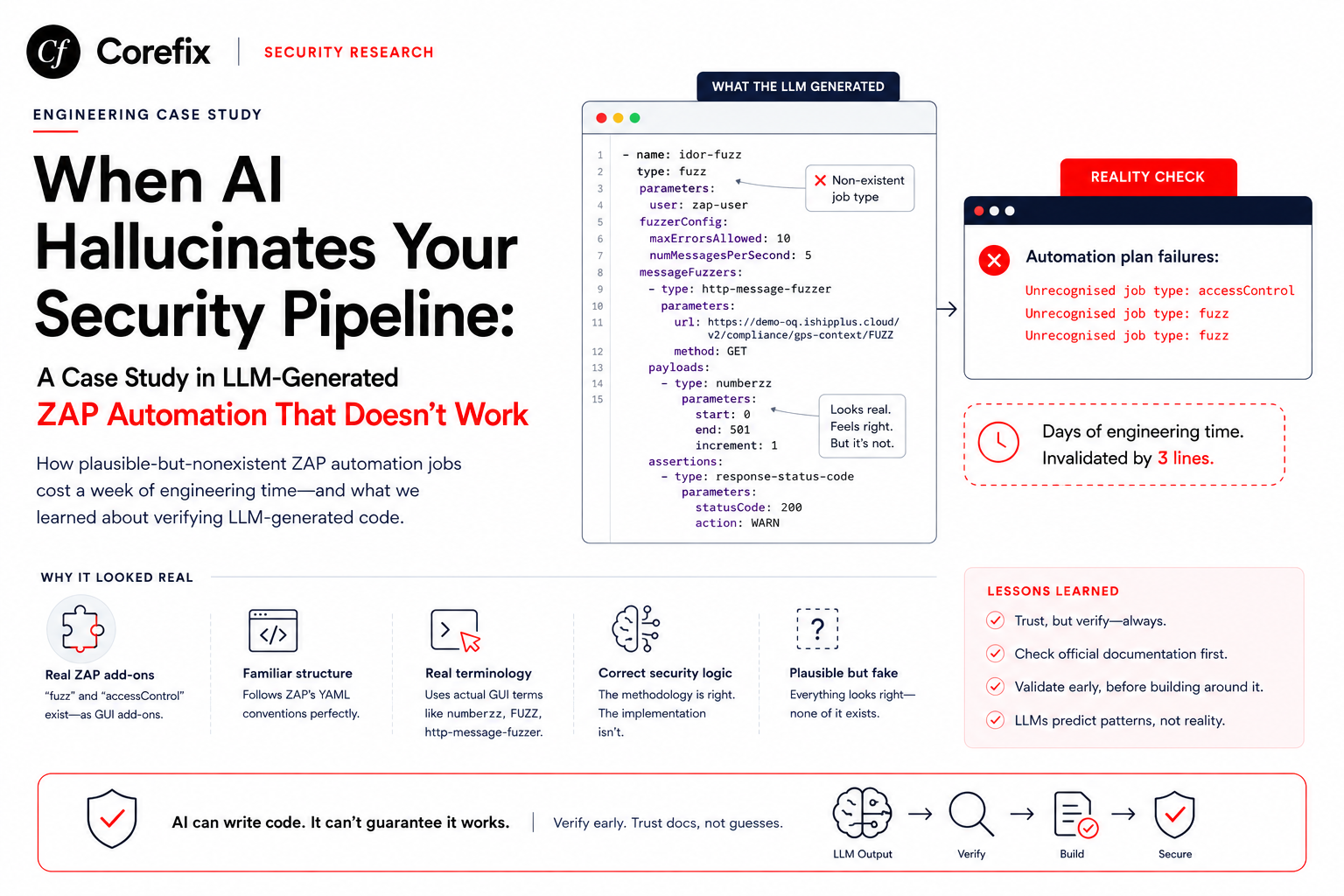
Automation plan failures:
        Unrecognised job type: accessControl
        Unrecognised job type: fuzz
        Unrecognised job type: fuzz
Three lines that invalidated days of work. This is a case study in how LLMs hallucinate plausible-but-nonexistent APIs, and what it costs when you don't catch it early.
What the LLM Generated
We asked Claude (both Sonnet 4.6 and Opus 4.6) to generate ZAP automation YAML for IDOR testing, input validation fuzzing, and broken access control testing. Here's what it produced.
The IDOR Fuzz Job (Hallucinated)
- name: idor-fuzz
  type: fuzz
  parameters:
    user: zap-user
  fuzzerConfig:
    maxErrorsAllowed: 10
    numMessagesPerSecond: 5
  messageFuzzers:
    - type: http-message-fuzzer
      parameters:
        url: https://demo-oq.ishipplus.cloud/v2/compliance/gps-context/FUZZ
        method: GET
      payloads:
        - type: numberzz
          parameters:
            start: 0
            end: 501
            increment: 1
      assertions:
        - type: response-status-code
          parameters:
            statusCode: 200
            action: WARN
The Validation Fuzz Job (Hallucinated)
- name: validation-fuzz
  type: fuzz
  parameters:
    user: zap-user
  fuzzerConfig:
    maxErrorsAllowed: 20
    numMessagesPerSecond: 5
  messageFuzzers:
    - type: http-message-fuzzer
      parameters:
        url: https://demo-oq.ishipplus.cloud/v2/login
        method: POST
        data: '{"username":"FUZZ","password":"Demo@123"}'
        headers:
          Content-Type: application/json
      payloads:
        - type: file
          parameters:
            file: /zap/fuzz-files/validation-master.txt
The Access Control Job (Hallucinated)
- name: access-control-bac
  type: accessControl
  parameters:
    context: "BAC-Context"
    scanAsUnAuthUser: true
    numberOfThreads: 3
    raiseAlert: true
Every field name is reasonable. The structure follows ZAP's conventions. The parameter names (fuzzerConfig, messageFuzzers, payloads, assertions) feel like they belong. If you've used ZAP's GUI Fuzzer, you'd recognize the concepts — numberzz is a real payload generator, http-message-fuzzer sounds right, FUZZ as a placeholder is standard in fuzzing tools.
The problem is that none of these job types exist in ZAP's Automation Framework.
Why the Hallucination Was Convincing
The LLM didn't randomly invent these configurations. It synthesized them from real ZAP concepts:
fuzzadd-on exists — ZAP hasfuzz-beta-13.16.0.zapas an installable add-on. It provides a GUI Fuzzer dialog with all the features described: payload generators, fuzzer configurations, message fuzzers, assertions. The LLM knew about the add-on's capabilities and projected them onto the Automation Framework.accessControladd-on exists — ZAP hasaccessControl-alpha-13.zap. It provides an Access Control Testing panel in the GUI with user-based request replay, unauthenticated scanning, and alert generation. Again, real features projected onto a YAML interface.The YAML structure follows ZAP conventions — other job types like
activeScanandspideruse the sametype+parametersstructure. The hallucinated jobs are structurally identical to real ones.Parameter names match GUI terminology —
numberzz,http-message-fuzzer,scanAsUnAuthUserare terms from ZAP's actual GUI. The LLM extracted these from training data and placed them in a YAML context where they looked natural.The logic is correct — the IDOR testing approach (enumerate IDs, check 200 responses, flag unauthorized access) is sound security methodology. The validation approach (send garbage payloads, flag 500s and silent accepts) is standard. The LLM got the security concepts right and the tool implementation wrong.
This is the most dangerous category of hallucination: correct concepts in a plausible but nonexistent interface.
The Verification Gap
Here's the timeline of how this escalated:
Day 1: Asked LLM to generate ZAP automation YAML for IDOR testing. LLM produces fuzz job type. Looks correct. We start building pipeline code around it.
Day 2: Asked LLM to separate IDOR from Broken Access Control. LLM produces separate YAML files — one with fuzz jobs for IDOR, one with accessControl job for BAC. Both look professional. We write classification logic to generate these job types from HAR analysis.
Day 3: Asked LLM about POST body fuzzing, UUID fuzzing, validation fuzzing. LLM keeps building on the fuzz job type with increasingly detailed configurations. We write more pipeline code to handle messageFuzzers arrays, payloads arrays, assertions arrays.
Day 4: Asked LLM about multi-user session swap, cross-user IDOR. LLM adds accessControl job with user parameters. We write user management code.
Day 5: First actual test run. ZAP rejects everything.
Unrecognised job type: accessControl
Unrecognised job type: fuzz
Unrecognised job type: fuzz
At no point during days 1–4 did anyone verify that fuzz and accessControl are valid automation framework job types. The LLM was never uncertain about them. It never hedged with "this might not be supported" or "verify this job type exists." It presented them with the same confidence as spider and activeScan.
What the LLM Should Have Known
ZAP's Automation Framework documentation lists all supported job types explicitly. The fuzz and accessControl add-ons are documented as GUI features. This information exists in ZAP's official documentation, GitHub repository, and community discussions. The LLM had this training data but failed to distinguish between "this feature exists in ZAP" and "this feature is available in ZAP's Automation Framework."
The actual supported job types (as of ZAP 2.15+):
activeScan
addOns
alertFilter
delay
graphql
import
openapi
passiveScan-config
passiveScan-wait
replacer
requestor
script
soap
spider
spiderAjax
report
Notice: no fuzz, no accessControl.
The Real Cost
This wasn't just wasted conversation time. It was wasted engineering time:
Pipeline code to generate
messageFuzzersarrays — parsing HAR files, classifying parameters as IDOR vs validation targets, generating payload configurations, handling numberzz vs file payload types, generating assertions. Roughly 400 lines.Pipeline code to generate
accessControljobs — building context configurations with multiple users, generating unauth scan parameters, building cross-user replay configurations. Roughly 200 lines.YAML template generation — serializing the above data structures into YAML with anchors, references, and proper indentation. Roughly 150 lines.
Testing infrastructure — Docker run commands, volume mounts, fuzz-file generation, payload list creation. Roughly 250 lines.
The endpoint classification logic, LLM prompt engineering, and HAR parsing were all valid — they produce the right data. But the output format was targeting a nonexistent interface.
The Fix
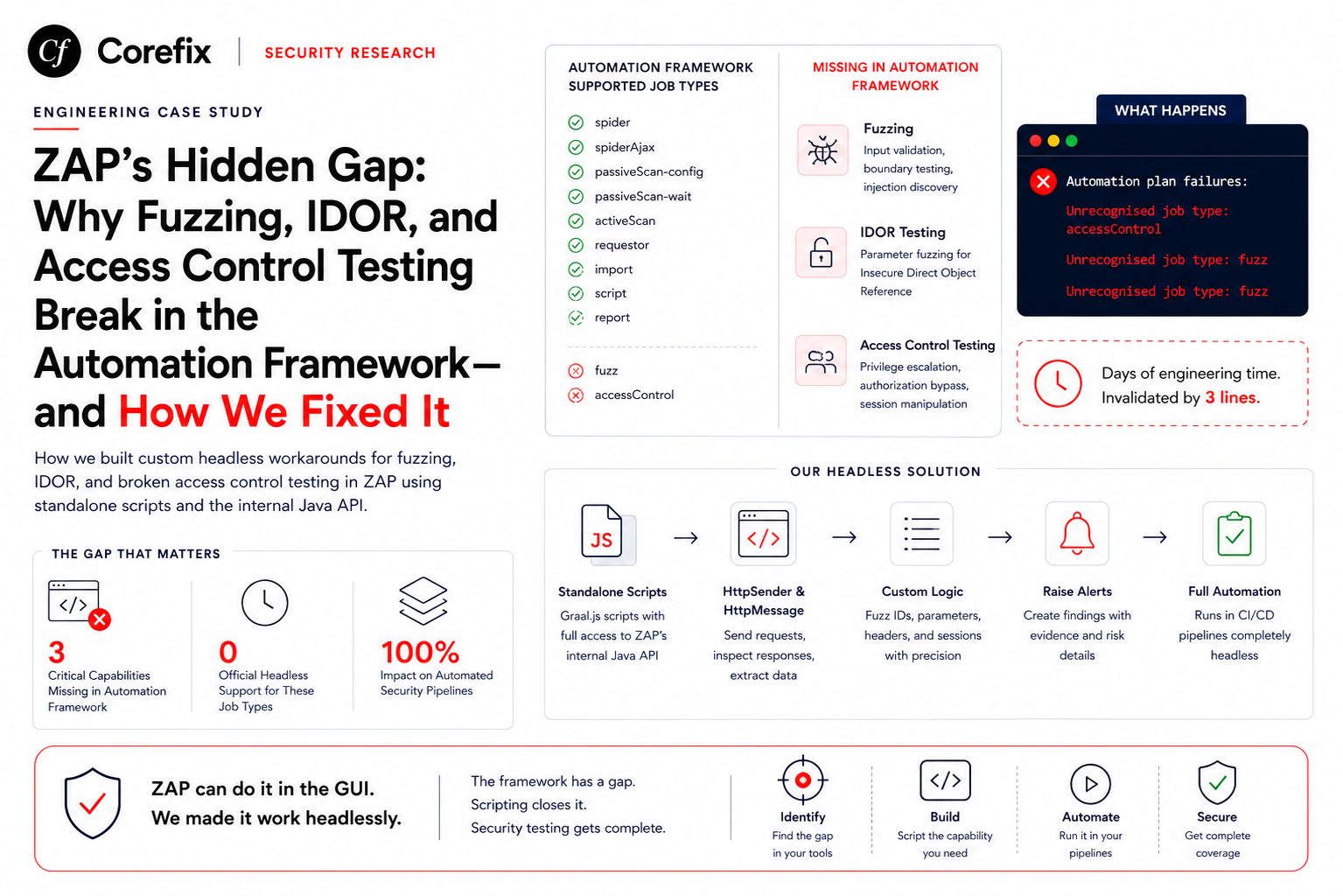
The workaround uses ZAP's script job type (which IS supported) to run standalone Graal.js scripts that call ZAP's internal Java API directly:
# Instead of the hallucinated fuzz job:
- name: add-custom-fuzz
  type: script
  parameters:
    action: add
    type: standalone
    engine: Graal.js
    name: CustomFuzzer
    file: /zap/wrk/custom-fuzz.js

- name: run-custom-fuzz
  type: script
  parameters:
    action: run
    type: standalone
    name: CustomFuzzer
Inside custom-fuzz.js, the script uses HttpSender and HttpMessage from ZAP's Java API to send requests, inspect responses, and raise alerts — replicating everything the hallucinated YAML jobs described, but through a real, working interface.
The pipeline code change was surprisingly small: instead of serializing data into YAML job entries, it serializes the same data into a JavaScript file with the endpoint lists and payloads embedded as arrays. The classification logic, HAR parsing, and LLM prompt engineering were unchanged.
Lessons for Using LLMs to Generate Tool Configurations
1. Verify job types / API endpoints exist before building around them
If an LLM generates configuration for a specific tool, check the tool's documentation for a definitive list of supported features. Don't trust the LLM's confidence — it's equally confident about real and hallucinated APIs.
For ZAP specifically, run:
docker run --rm ghcr.io/zaproxy/zaproxy:stable \
  zap.sh -cmd -autorun /dev/null 2>&1
This produces error output that reveals which job types are registered.
2. Test early, test small
Don't build 1000 lines of pipeline code before running a single test. Create a minimal YAML with one fuzz job and one accessControl job. Run it. If it fails, you've lost 10 minutes, not 5 days.
3. Watch for "too perfect" LLM output
When an LLM generates a complex configuration and every field name feels right, that's a signal to verify more carefully, not less. Real tool configurations have quirks, inconsistencies, and legacy naming. Perfect consistency often means the LLM is inventing a clean API that doesn't match the tool's actual messiness.
4. Ask the LLM to cite its sources
When generating tool-specific configurations, ask: "Show me the documentation page where this job type is defined." If the LLM can't point to a specific URL or docs section, treat the output as unverified.
5. Separate concepts from implementation
The LLM got the security concepts exactly right: IDOR testing via ID enumeration, validation fuzzing via type-breaking payloads, BAC via unauthenticated replay. The concepts survived the implementation change — we just expressed them through a different ZAP interface (standalone scripts instead of YAML jobs). If we'd built the pipeline with a cleaner separation between "what to test" and "how to express it to ZAP," the migration would have been even smaller.
The Broader Pattern
This isn't unique to ZAP. LLMs hallucinate plausible tool configurations across the ecosystem:
- Kubernetes — generating valid-looking CRDs for operators that don't support them
- Terraform — inventing provider arguments that look right but don't exist
- CI/CD — creating GitHub Actions step configurations with nonexistent inputs
- Docker — generating Dockerfile instructions with plausible but wrong syntax for specific base images
The pattern is always the same: the LLM knows the tool exists, knows its general capabilities, and projects those capabilities onto the most logical interface — even when that interface doesn't support them.
Conclusion
LLMs are powerful tools for generating security configurations and automation code. But they have a specific failure mode that's especially dangerous for DevSecOps: generating plausible configurations for tool interfaces that don't exist. The output looks professional, follows conventions, and implements correct security concepts — through APIs that were never built.
The defense is simple: verify before you build. Run the minimal configuration. Check the tool's documentation for a definitive feature list. And when the LLM is supremely confident about a tool-specific configuration, that's exactly when you should double-check.
Our pipeline works now. The security concepts the LLM generated were sound. The endpoint classification logic was correct. The fuzz payloads were appropriate. We just had to change the last mile — from hallucinated YAML job types to real standalone scripts. The 1000 lines of pipeline code needed about 50 lines of changes.
But those 50 lines cost us a week.
This article is part of our series on building automated security pipelines with OWASP ZAP and AI. See our companion article: ZAP's Hidden Gap: Why Fuzzing, IDOR, and Access Control Testing Break in the Automation Framework — and How We Fixed It.