

We set out to build CoreFix Labs: a feature that lets a user click one button and get a live, isolated, intentionally-vulnerable website running in the browser - something to point our scanner at before connecting a real codebase. Six target apps. Each one should have been a single docker run command inside an ephemeral Vercel Sandbox.
Five of them were.
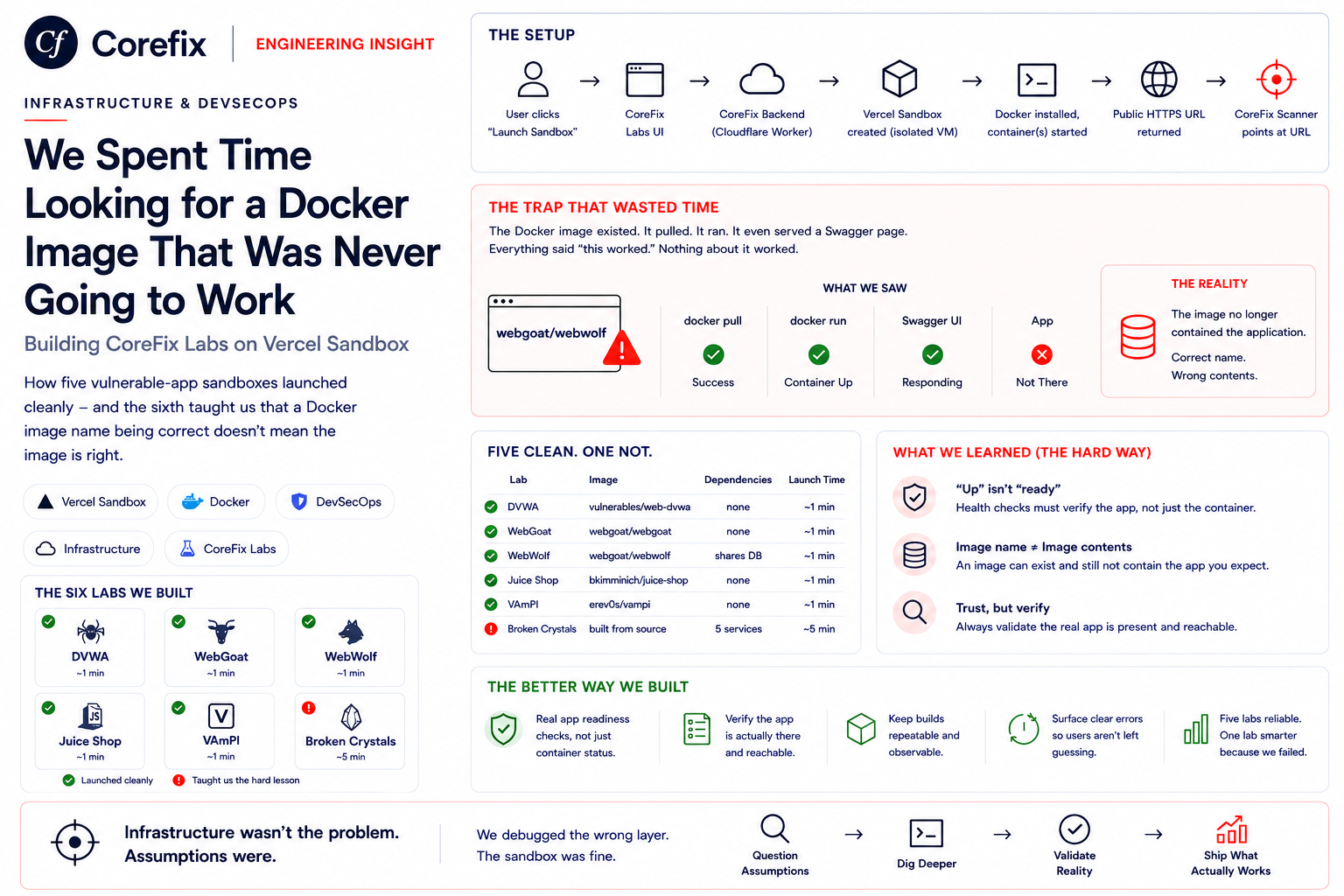
The sixth took longer than the other five combined, because the Docker image we pulled - the one with the exact right name, from the project's own GitHub org - simply didn't contain the application anymore. It pulled. It ran. It even served a working Swagger page. Everything about it said "this worked." Nothing about it worked.
This is the story of building all six, in order, and the one that broke every assumption we had about what "the image exists and runs" actually proves.
What We Were Building
The flow is intentionally simple from the user's side:
User clicks "Launch Sandbox"
        ↓
CoreFix Labs UI
        ↓
CoreFix Backend (Cloudflare Worker)
        ↓
Vercel Sandbox created (isolated Linux microVM)
        ↓
Docker installed inside the sandbox, container(s) started
        ↓
Public HTTPS URL returned
        ↓
CoreFix Scanner points at that URL
Each sandbox is created on demand via Vercel's REST API, gets its own public URL automatically, and self-destructs after a fixed lifetime. From our backend's point of view, "launching a lab" is: request a sandbox, run a handful of shell commands inside it over an API, and hand the resulting URL to the user. No servers to manage, no ports to route ourselves, no cleanup beyond a timer.
That simplicity is what made five of the six labs almost anticlimactic. It's also what made the sixth so disorienting - the sandbox layer worked identically every time. Every difference we ran into was one layer up, inside the container itself.
The Six Labs at a Glance
| Lab | Image | Dependencies | Launch Time (click to ready) | Deployment |
|---|---|---|---|---|
| DVWA | vulnerables/web-dvwa | none | ~1 min | single container |
| WebGoat | webgoat/webgoat | none | ~1 min | single container |
| WebWolf | webgoat/webgoat | shares WebGoat's DB | ~1 min | single container, two ports |
| Juice Shop | bkimminich/juice-shop | none | ~1 min | single container |
| VAmPI | erev0s/vampi | none | ~1 min | single container |
| Broken Crystals | built from source | 5 services | ~5 min | custom multi-container |
Launch time here is what the user actually waits on the frontend - sandbox provisioning plus container boot - not just the container's own startup. Five labs land around the same one-minute mark regardless of how fast their individual container boots, because sandbox creation and Docker install dominate that time. Broken Crystals is the outlier at roughly five minutes, almost entirely spent on the source build and bringing up five supporting services in order.
Lab 1: DVWA
Before Vercel Sandbox was even in the picture, we tried Railway. DVWA deployed, but returned Apache's default page instead of the app - it needed a MySQL connection that Railway's single-container model didn't give us a clean way to provide. That failure is what pushed us to Vercel Sandbox: we needed real shell access, not just a pre-built container target.
Once we had that:
docker run -d -p 3000:80 --name dvwa vulnerables/web-dvwaWorking in about a minute - login page loaded, default credentials (admin / password) worked immediately. This became our baseline: if a lab this simple ever broke, something was wrong with the sandbox itself, not the app.
Lab 2: WebGoat
WebGoat pulled and ran cleanly:
docker run -d -p 8080:8080 --name webgoat webgoat/webgoatdocker ps showed it Up. We hit the root URL. 404. The image was correct - WebGoat just serves itself at /WebGoat, not /.
The more useful trap was timing: WebGoat is a Spring Boot app, and docker ps reported Up seconds after start, while the JVM was still booting. Our first health check passed against a container that wasn't ready to serve anything yet. We built in enough wait for the JVM to actually finish booting and, more importantly, stopped treating docker ps as a readiness signal at all - that fix is part of what keeps WebGoat's launch reliable inside the same ~1 minute window as the simpler labs.
Lab 3: WebWolf
There is a Docker image literally called webgoat/webwolf - not a fork, the official companion image, named exactly what you'd expect:
docker run -d -p 9090:9090 --name webwolf webgoat/webwolfIt crashed on boot, every time:
Caused by: java.net.ConnectException: Connection refused (Connection refused)
    at org.hsqldb.ClientConnection.openConnection
WebWolf isn't standalone - it shares WebGoat's database, and the webgoat/webwolf image has no database of its own to connect to. The name being exactly right told us nothing about whether it could run in isolation.
The fix came from WebGoat's own docker ps output, which showed a port we hadn't mapped:
PORTS: 0.0.0.0:8080->8080/tcp, :::8080->8080/tcp, 9090/tcpWebWolf was already inside the webgoat/webgoat image, just unexposed. Running that image with both ports mapped was the actual fix:
docker run -d -p 8080:8080 -p 9090:9090 --name webwolf webgoat/webgoatConfirmed working - curl http://localhost:9090/WebWolf returned a 302 to login.
Lab 4: Juice Shop
One image, no dependencies, up and reachable within the usual ~1 minute:
docker run -d -p 3000:3000 --name juice-shop bkimminich/juice-shopWe'd originally planned two separate instances of it - one for SPA-style crawling, one for HAR-based traffic recording, since CoreFix can scan a target either way and each mode benefits from a clean, untouched instance. In practice that meant two catalog entries running the exact same image for what looked, to a user, like the identical site. We consolidated it to a single "OWASP Juice Shop" entry. Not every problem in this project was a technical bug; this one was a product decision that had been masquerading as an infrastructure requirement.
Lab 5: VAmPI
Python Flask, no UI, no login flow, one dependency-free container:
docker run -d -p 5000:5000 --name vampi erev0s/vampiReady within the usual ~1 minute, welcome JSON on the root endpoint immediately once it was. Worth including mainly as contrast - this is what "correct image, no surprises" actually looks like when it's true. It's also the last lab where that was true.
Lab 6: Broken Crystals
What We Pulled
docker run -d -p 3000:3000 --name broken-crystals \
  neuralegion/brokencrystals:development
The image existed under the project's real GitHub org. It pulled without error, started without error, and docker ps showed it Up.
curl http://localhost:3000/swagger  →  200
curl http://localhost:3000/         →  404
Why It Looked Like Success
- The image name matched the project's actual GitHub org
- Zero errors in the container logs
- Swagger - a real subsystem of the backend - loaded and rendered correctly
- The API returned proper JSON error shapes instead of crashing
If we'd stopped at "does something respond," this would have shipped as done. The only thing broken was the one page a user actually looks at first.
The Escalation
Attempt 1 - wrong credentials. We guessed reasonable Postgres defaults (postgres / password). Everything 404'd except Swagger, with no error explaining why - the app was silently failing to connect to a database and serving nothing back.
Attempt 2 - real credentials, still broken. The actual expected connection string leaked through the app's own /api/config endpoint:
{ "sql": "postgres://bc:bc@postgres:5432/bc" }Fixed Postgres to use bc/bc/bc. Swagger still worked. Homepage still 404'd.
Attempt 3 - inspected the image directly.
docker exec broken-crystals sh -c "find /var/www -name index.html"Nothing. The image had a dist/ folder for the backend and no client/dist at all. Pulling the project's actual Dockerfile from GitHub showed the build step that should have produced it:
RUN npm run build --prefix=client
COPY --from=build /usr/src/app/client/dist ./client/dist
The image had no client/dist for the same reason a snapshot taken before that build step existed wouldn't have one - whether that's exactly what happened here or the publish process simply skipped it, the evidence pointed the same direction: this published image did not reflect the current build.
Attempt 4 - tried the renamed org's image. NeuraLegion had renamed to Bright Security; their newer image (brightsec/brokencrystals) gave the identical result. Two different organizations, two different tags, the same missing frontend.
What the Source Revealed
At that point the only reliable option was building from current source - which surfaced a second layer of the problem. Broken Crystals isn't single-container at all; its compose.local.yml defines five supporting services around the app, wired together with real dependencies, not a simple sequence:
Keycloak DB
    └── Keycloak

App DB
    └── Broken Crystals App
            ├── requires Keycloak (running)
            ├── requires Mailcatcher
            └── requires Ollama

Mailcatcher
Ollama
Keycloak needs its own database before it can start; the app needs Keycloak, its own database, Mailcatcher, and Ollama all reachable before it will boot at all. Every other lab in this project was one command. This one was an actual small distributed system.
Getting the source was its own detour: git clone failed intermittently inside the sandbox with terminal prompts disabled, and we'd initially had the wrong GitHub org entirely (Bright-Security instead of the correct NeuraLegion). The fix was dropping the git protocol for a plain HTTPS tarball:
curl -sL https://github.com/NeuraLegion/brokencrystals/archive/refs/heads/stable.tar.gz \
  -o /tmp/bc.tar.gz
tar -xzf /tmp/bc.tar.gz -C /tmp/brokencrystals --strip-components=1
Then build from that source and bring the five dependent services up before the app, on a shared network:
docker network create bc
docker run -d --network bc --name db -e POSTGRES_USER=bc -e POSTGRES_PASSWORD=bc -e POSTGRES_DB=bc postgres:17-alpine
docker run -d --network bc --name keycloak-db -e POSTGRES_DB=keycloak -e POSTGRES_USER=keycloak -e POSTGRES_PASSWORD=password postgres:17-alpine
docker run -d --network bc --name keycloak quay.io/keycloak/keycloak:26.1.2 start-dev --import-realm
docker run -d --network bc --name mailcatcher sj26/mailcatcher
docker run -d --network bc --name ollama brightsec/brokencrystals-ollama:smollm135m
docker run -d -p 3000:3000 --network bc --name broken-crystals brokencrystals:local
The Real Cost
- 4 distinct image/approach attempts before we stopped trusting published registries entirely
- 14+ debug and test scripts written to isolate exactly which layer was failing
- 6 containers, dependency-ordered, versus one
docker runfor every other lab - ~5 minutes total launch time for the user, versus ~1 minute for every other lab
Confirmed Fix
curl http://localhost:3000/                     →  200  (real React frontend)
curl http://localhost:3000/swagger              →  200
curl http://localhost:3000/api/products/latest  →  real Postgres-backed JSON
The homepage that had 404'd through four attempts finally rendered: "Your Vulnerable Crystal Marketplace," full navigation, working login. Everything we'd been chasing - a running app, a real database, a working auth layer - was correct. We'd just had it pointed at a container that had never contained it.
What We Learned
1. A container running is not evidence the application works. docker ps showing Up, or even a 200 on one endpoint, only proves something inside is answering - not that the thing you actually need is present.
2. A correct image name is not proof of a correct image. webgoat/webwolf and neuralegion/brokencrystals both matched their project's real names exactly. Neither contained what we needed. Check the image's actual contents, not just its label.
3. Published images can lag behind the source repository, especially in actively-developed projects. When a published image looks inconsistent with the current application, the repository's Dockerfile and build process are often the best place to verify what the image is supposed to contain.
4. Readiness checks need to test what a user will actually see. Swagger loading told us the backend framework was alive - nothing about the frontend, database, or identity provider. Health-check the real entry point, not the easiest endpoint to check.
5. Read the compose file before assuming single-container deployment. The dependency graph was documented in the repo the whole time; we just hadn't opened it yet.
What We'd Do Differently
- Treat every third-party image as untrusted until verified. Don't trust a successful pull and boot - inspect the contents for what actually matters (in this case,
client/dist) before building anything on top of it. - Separate "container started" from "application ready" as a hard rule, not a per-lab afterthought - a real HTTP check against the actual user-facing path, not just any 200.
- Maintain a lab-specific health-check contract - each lab config should declare which path proves it's actually ready, not default to
/. - Pin known-good image digests, not just tags, for images we don't control, so a registry-side change can't silently break a lab that was working yesterday.
- Build and maintain our own image for Broken Crystals instead of rebuilding from source on every launch - the 260-second boot is dominated by the build step, and that's fixable once, not on every user click.
The Broader Pattern
This isn't specific to security-testing sandboxes. Any actively-developed open-source project can accumulate this same gap: published Docker images, npm packages, and Helm charts drifting out of sync with the source repository that's supposed to define them. A project renaming its GitHub org, as NeuraLegion did to Bright Security, makes it worse - now there are two plausible image sources, and neither is guaranteed current.
The instinct to trust "it pulled, it ran, something responded" is exactly the instinct that costs the most time when it's wrong. The fix is the same regardless of tool: check what the source repository's own build process actually produces, and verify the artifact against that - not against whether the command exited with status 0.
Where This Leaves CoreFix Labs
All six labs are live: DVWA, WebGoat, WebWolf, OWASP Juice Shop, VAmPI, and Broken Crystals, each launched on demand as an isolated Vercel Sandbox with a public URL and an auto-expiring session. Five of them are ready in about a minute from a single docker run. One is a small distributed system we currently build from source on every launch, at around five minutes - which is its own open question for a future post: keep rebuilding it live, or build once and publish our own current image so future sandboxes launch in closer to a minute too.
That's the next thing we'll get wrong with confidence, presumably. We'll write about it when we do.