
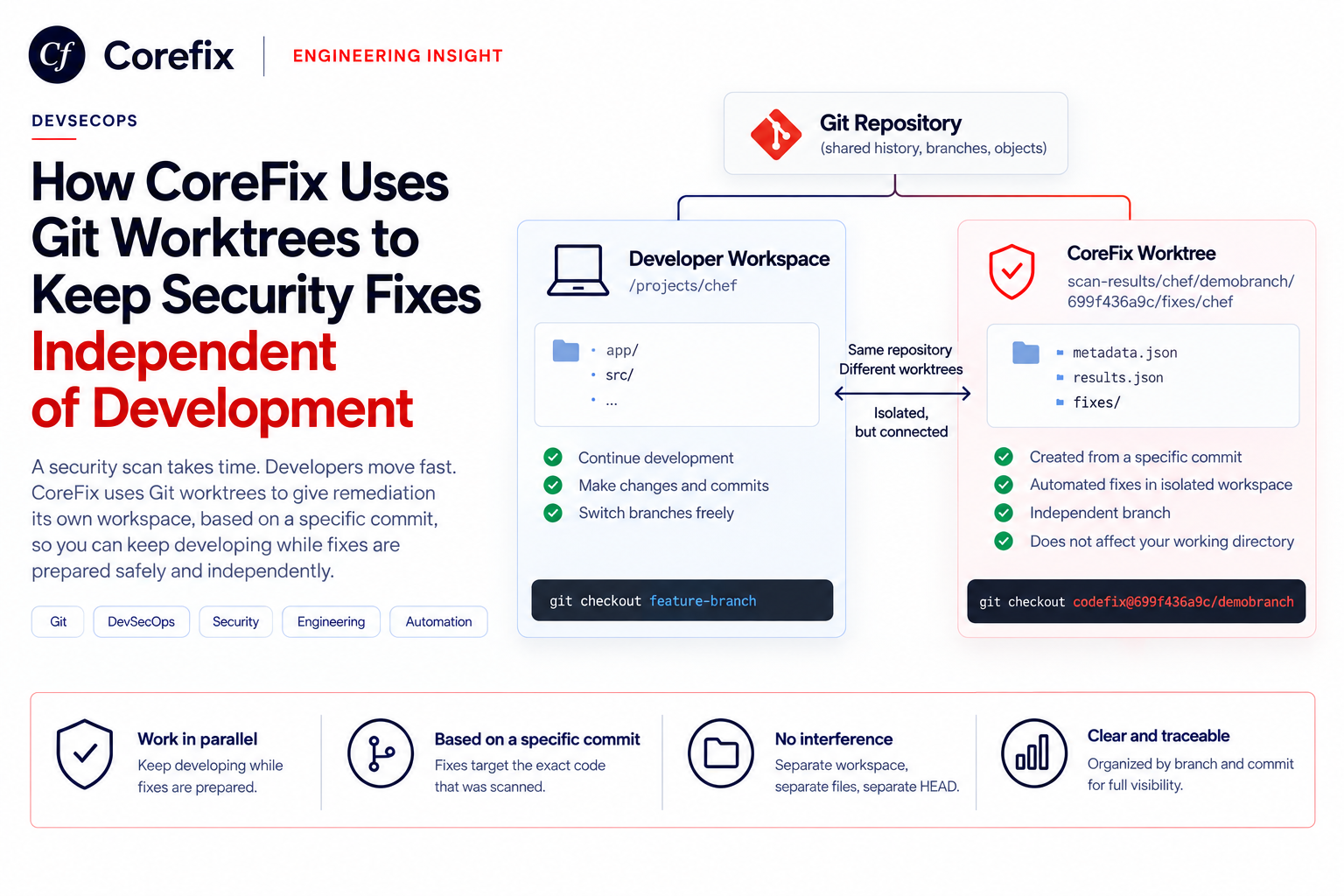

A security scan takes time. While it runs, a developer might edit a file, commit a feature, or switch branches to investigate a production issue. By the time an automated fix is ready, the code in the developer's working directory may have changed.
That creates a practical question: which version of the code should the fix apply to?
CoreFix's default workflow starts from a specific committed snapshot and gives remediation its own Git worktree and branch. Developers can continue working while fixes are prepared against the code that was scanned.
A branch identifies the work; a commit identifies the snapshot
A branch name is a moving reference. demobranch might point to one commit when scanning begins and a newer commit when remediation finishes.
A commit SHA identifies a particular version of the repository. CoreFix records both the source branch and the selected commit, then organizes the scan output around them:
scan-results/
└── chef/
    └── demobranch/
        └── 699f436a9c/
            ├── metadata.json
            ├── results.json
            └── fixes/
                └── chef/
The branch provides context. The commit identifies the starting code. Keeping both makes it possible to distinguish a fix for yesterday's scan from one generated after today's changes.
Uncommitted edits in the developer's checkout are excluded from this snapshot. To include those edits in a new scan, they need to be committed first.
Two working directories, one Git repository
Git worktrees let one repository have multiple checked-out working directories. Each worktree has its own files, staging area, and HEAD, while sharing Git objects and branch references with the repository.
CoreFix uses this separation to give the developer and the remediation process different places to work:
                    Shared Git repository
                  Commit history and branches
                             |
             +---------------+----------------+
             |                                |
             v                                v
     Developer checkout                CoreFix worktree
     /projects/chef                    scan-results/.../fixes/chef
             |                                |
     Feature development               Scan snapshot and fixes
     Local edits                       Separate files and staging
     Branch switching                  Independent HEAD
Creating a linked worktree does not require an independent clone with another complete copy of the repository's Git history. It does create a separate checkout of the files.
This is Git workspace isolation. The worktrees still share repository metadata, so a new fix branch is visible when listing branches from the original checkout.
Start with detached HEAD to scan a specific commit
The scanner creates its worktree at the selected commit, using a command equivalent to:
git worktree add --detach <scan-worktree> <scanned-commit>--detach means the worktree's HEAD points directly to that commit instead of following a named branch:
Developer checkout:  HEAD -> demobranch -> 699f436a9c
Scan worktree:       HEAD --------------> 699f436a9c
This is why Git can initially display (no branch) or HEAD detached at ... inside the scan directory. It is an intentional checkout state, not a missing branch or an error.
The scanners read this committed snapshot. Changes in the developer's separate working directory do not change the files being scanned.
Turn the scan worktree into the fix worktree
When remediation starts, the Python agent locates the worktree the scanner prepared. In the normal flow, it reuses that directory.
Before attaching a fix branch, the agent checks that the directory is a worktree root and belongs to the same Git repository as the source checkout. For a detached worktree, it resolves the snapshot commit from Git and checks that HEAD matches that value during preparation.
It then creates a branch whose name includes the scan's short SHA and source branch:
codefix@699f436a9c/demobranchThe branch creation is equivalent to running this inside the scan worktree:
git checkout -b codefix@699f436a9c/demobranchThe directory stays the same. Its Git state changes:
Before remediation
HEAD -> 699f436a9c

After branch creation
HEAD -> codefix@699f436a9c/demobranch -> 699f436a9c

After fixes are committed
HEAD -> codefix@699f436a9c/demobranch -> fix commit
The SHA in the branch name identifies the starting snapshot. It stays in the name as new remediation commits are added.
What happens when the developer switches branches?
Suppose the scan starts on demobranch, then the developer switches the original checkout to feature/payments.
Each worktree has its own HEAD, so that switch affects the developer's checkout. It does not switch the remediation worktree:
Developer checkout                  CoreFix worktree
HEAD -> feature/payments            HEAD -> codefix@699f436a9c/demobranch
         |                                   |
         New feature work                    Security fixes for the scan
CoreFix carries the selected source branch separately from the developer's current checkout. The remediation process continues writing to its own worktree rather than following the developer into the new branch.
The developer's uncommitted files and staging area also remain separate from the fix worktree's files and staging area.
What happens when the histories diverge?
Branch switching is one case. Another is the developer adding commits to the scanned branch while fixes are being prepared.
Both lines of work can grow from the scanned commit:
                   B --- C       demobranch
                  /
... --- A -------+
                  \
                   F1 --- F2     codefix@699f436a9c/demobranch

A       Scanned commit: 699f436a9c
B, C    Later development commits
F1, F2  Security remediation commits
This divergence is normal Git history. The fix branch retains its relationship to the scanned code while development progresses independently.
Isolation does not guarantee that F1 and F2 will merge cleanly into C. If both lines of work change the same code, integration can require conflict resolution. Even a clean merge needs testing against the newer codebase.
The fix branch gives reviewers a concrete set of commits to inspect and integrate through their normal pull request, merge, rebase, or cherry-pick workflow. Fix generation and integration remain separate steps.
Resume an existing fix or scan the new code
Continuing an unfinished remediation and scanning the developer's latest code are different operations.
For a compatible unfinished scan, CoreFix can reuse its recorded scan context and existing remediation worktree. Switching the developer's branch does not redirect those pending fixes into the newly checked-out files.
When a detached scan worktree is being attached to an existing fix branch, the agent checks that the scanned commit is an ancestor of that branch:
git merge-base --is-ancestor <scanned-commit> <fix-branch>This permits resuming a branch containing previous fixes from that snapshot. An incompatible branch is rejected in this path. An existing remediation worktree checked out on an unexpected branch is also rejected.
To scan and fix the current checkout instead, the rescan workflow selects a new snapshot. This matters after substantial development changes: findings from the earlier snapshot do not establish the security state of the latest code.
Reviewable commits without interrupting development
The remediation flow commits changes per file, with messages describing the findings addressed. Commit operations are serialized through a worker queue, preventing the agent's commit workers from competing over the same staging area.
When configured to create a pull request, CoreFix uses the remediation branch as the head and the selected source branch as the base. Reviewers can inspect the proposed changes before integrating them with ongoing development.
This article describes CoreFix's default isolated workflow. The explicit in-place option uses the supplied checkout directly and has different behavior.
Git worktrees let the developer's workspace keep moving while the remediation workspace stays tied to the selected scan. The resulting branch preserves where the fixes started, records what changed, and gives the team a familiar path to review, test, and merge them.