
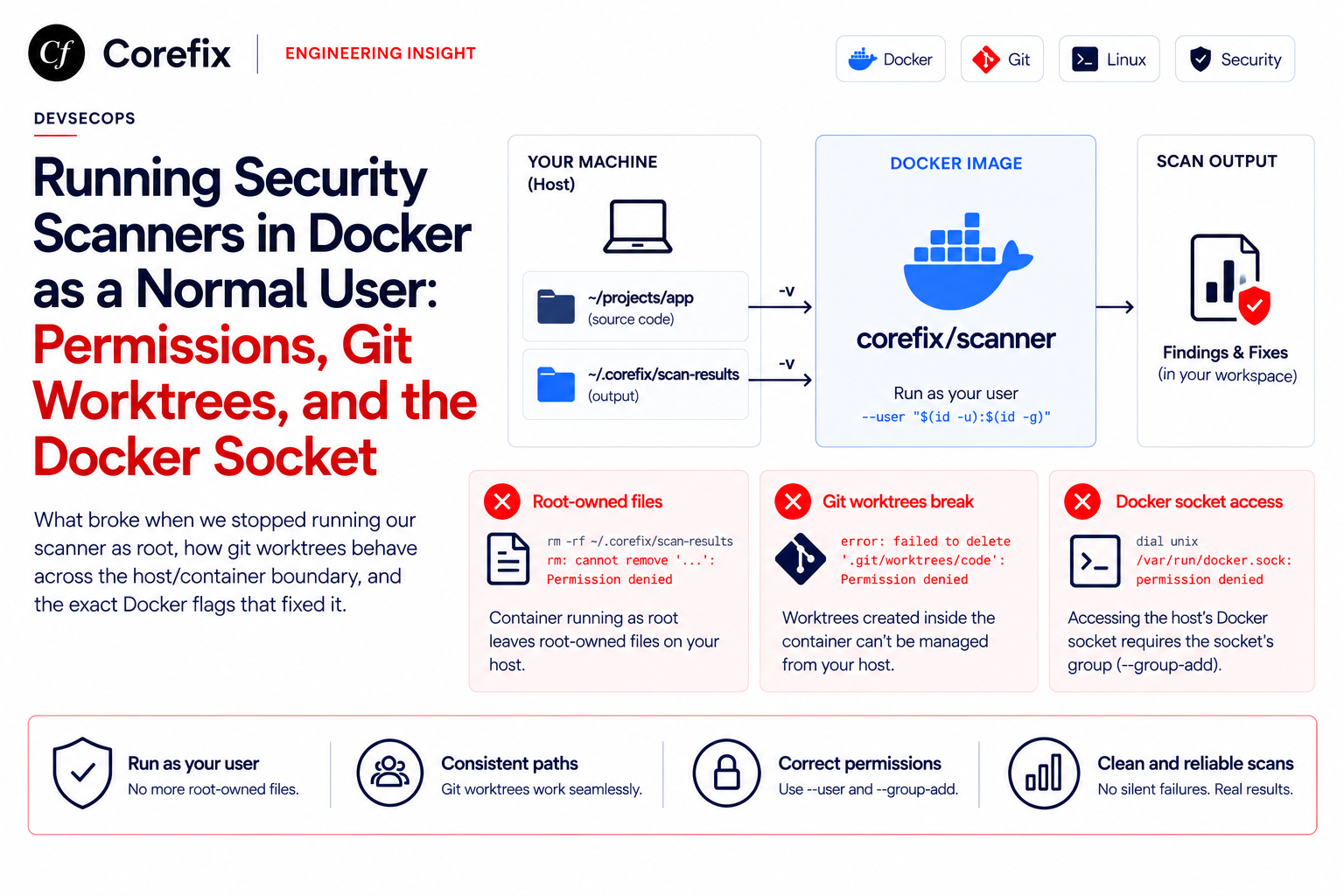

Research notes from building the CoreFix CLI: permissions, git worktrees across the host/container boundary, and passing the right group IDs to a container.
TL;DR
- Our scanner image was built to run as root. Wrapping it in a local CLI meant every scan left root-owned files in the developer's own repo and home directory.
- Running the container as the host user (
--user "$(id -u):$(id -g)") fixes ownership, but exposes every hidden "I'm root" assumption in the image: writes to/,su, tools installed under/root, and failures that were swallowed and reported as "0 findings". git worktreestores absolute paths. A worktree created inside a container at/output/...pointing to/code/.git/...is not a valid repository on the host. The fix is to mount the repo and output at the same absolute path on both sides.- Reaching the host's Docker socket from an unprivileged container needs the socket's group:
--group-add "$(stat -c %g /var/run/docker.sock)".
The setup
CoreFix ships a small Go CLI that wraps a scanner image so nobody has to write the docker run by hand:
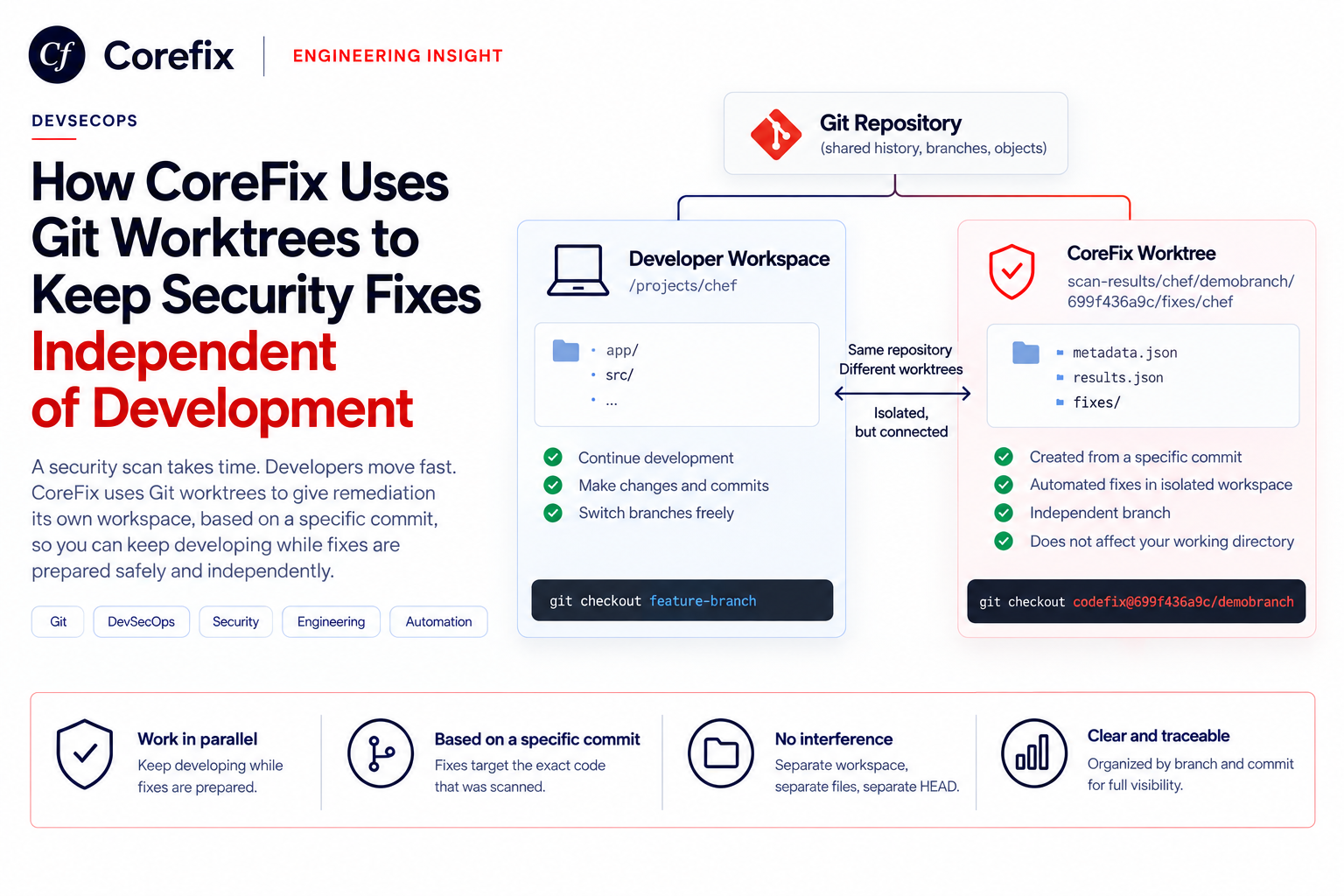
corefix code secrets,sastUnder the hood it mounts the repository being scanned and an output directory, and the container does the scan. For code fixes, the scanner creates a git worktree (an isolated checkout of the scanned commit) under the output directory, so an automated fixer can edit files without touching the developer's working tree.
host                                 container
~/projects/app          ── -v ──▶    /code
~/.corefix/scan-results ── -v ──▶    /output
                                      └─ app/main/<sha>/fixes/code   ← git worktree
This worked perfectly, as root.
Problem 1: root-owned files leak onto the host
A container running as root writes files as root, and bind mounts write straight through to the host. After a few scans:
$ git worktree remove /output/app/main/699f436a9c/fixes/code
error: failed to delete '.git/worktrees/code': Permission denied

$ rm -rf ~/.corefix/scan-results/app
rm: cannot remove '...': Permission denied
The scanner had created .git/worktrees/code inside the developer's own repository as root. Deleting scan results now needed sudo, and on many dev machines the user doesn't have it.
Docker adds a second trap: when a -v source doesn't exist, Docker creates it as a root-owned directory. So even first-run setup could plant root-owned folders in $HOME.
Fix
Run the container as the caller, give it a writable home, and create the mount sources ourselves before Docker can:
mkdir -p ~/.corefix/scan-results          # done by the CLI, as the user

docker run --rm \
  --user "$(id -u):$(id -g)" \
  -e HOME=/tmp \
  -v ~/.corefix:/tmp/.corefix \
  ...
Why HOME=/tmp? An arbitrary uid has no home directory in the image, and tools like git, Node and the scanners try to write config and caches under $HOME.
Problem 2: the image was full of "I'm root" assumptions
As soon as the container stopped being root, scanners started failing. Some failed loudly. The dangerous ones did not.
| Root-only assumption | What broke | Fix |
|---|---|---|
Logger writes to /pylogs/... (never created in the image) | Python scanner crashed on start | mkdir -p /pylogs && chmod 1777 /pylogs |
Reports written under /vapt-reports | Reports silently lost | same |
ln -sT <repo> /repo, then write the report to /repo/... | Can't create a symlink in / | write to the real path |
SonarQube started with su sonarqube -c ... | su: Authentication failure | start directly when not root |
SonarQube dirs owned by sonarqube:root, mode 770 | Unprivileged uid can't even enter them | chmod -R o+rX (+o+rwX on data/temp/logs) |
chmod +x ./sonar.sh before running it | EPERM even though the file was already executable | [ -x f ] || chmod +x f |
A CLI installed under /root/.tool/bin | /root is 700, tool "not found" | install to /usr/local/bin |
The silent failure: "0 findings"
The worst part wasn't the crashes. The worst part was that a crashed scanner looked like a clean scan.
The secrets scanner did this in container mode:
run(f"ln -sT {repo_path} /repo")                     # fails as non-root ... error swallowed
cmd = f"gitleaks dir {repo_path} --report-path /repo/{output_file}"
The helper's signature is run(cmd, fail_on_error=False), so the failed ln was ignored. gitleaks then tried to write the report to a path that didn't exist, the Python code looked for the report at the real path, didn't find it, logged "no output file, assuming zero findings", and the job ended with:
Scan job completed successfully for secrets.
Raw Findings count: 0
A security tool that reports "clean" after crashing is worse than one that just fails.
Two "obvious" fixes that don't work
We wanted an image-only fix so we wouldn't have to touch the scanner code. We tested the two obvious ones as uid 1001 against the real image, replaying the exact command sequence:
| Attempt | What happened |
|---|---|
mkdir /repo /work in the Dockerfile | ln -sT now fails with File exists. gitleaks writes its report into /repo, Python reads <repo_path>, finds nothing → silent 0 findings |
chmod 1777 / so ln can create the links | Permission denied at runtime. The root directory's mode does not survive into the container |
The real fix was a five-line change: stop routing through a symlink at / and write the report where it will be read.
# before: --report-path /repo/{output_file}   (via a symlink in /)
f'--report-path {self.repo_path}/{output_file}'
Verified as uid 1001: gitleaks wrote the report and found a planted private key; the IaC scanner wrote its results.json.
SonarQube as a normal user
SonarQube (and the Elasticsearch inside it) refuses to run as root, which is why the original script used su sonarqube. Under --user that is exactly what fails. The fix is to branch on who we already are:
if [ "$(id -u)" = "0" ]; then
    su sonarqube -c 'cd /opt/sonarqube && ./docker/entrypoint.sh' &
else
    (cd /opt/sonarqube && ./docker/entrypoint.sh) &
fi
We verified the result by starting it as uid 1001 and looking at the process table from inside the container:
$ docker exec sq ps -eo user:12,pid,args | grep java
1001   10 /opt/java/openjdk/bin/java -jar lib/sonarqube.jar ...
1001   32 /opt/java/openjdk/bin/java ... -Dcli.name=server ...
1001  126 /opt/java/openjdk/bin/java -Des.networkaddress.cache.ttl=60 ...
1001  207 ... (web)
1001  507 ... (compute engine)
Every JVM runs as 1001, SonarQube reaches UP in about 75 seconds, and the root path (cloud jobs) still works because the su branch is unchanged.
Problem 3: git worktrees across host and container
This was the most interesting bug, and it has nothing to do with root vs non-root.
How a worktree is wired together
git worktree add creates a second working directory backed by the same repository. It links the two with two small files, and both contain absolute paths:
worktree/.git                         →  gitdir: /code/.git/worktrees/code
repo/.git/worktrees/code/gitdir       →  /output/app/main/699f436a9c/fixes/code/.git
Inside the container those paths are correct, because the container sees the repo at /code and the worktree under /output. On the host, neither path exists:
$ cd ~/.corefix/scan-results/app/main/699f436a9c/fixes/code
$ git status
fatal: not a git repository: /code/.git/worktrees/code

$ git -C ~/projects/app worktree list
/home/alice/projects/app                          699f436a9c [main]
/output/app/main/699f436a9c/fixes/code            699f436a9c (detached HEAD) prunable
The files are owned by the right user and are all there, but the checkout is not a repository, and the developer's own repo is left with a dangling worktree registration (prunable).
        host view                                container view
  ~/projects/app/.git/worktrees/code/gitdir ──▶ /output/...     (doesn't exist on host)
  ~/.corefix/scan-results/.../code/.git     ──▶ /code/.git/...  (doesn't exist on host)
Options we considered
| Option | Why not |
|---|---|
git worktree repair on the host after each scan | Rewrites the links to host paths, but then the container's own cleanup (worktree remove for anything under /output) no longer recognizes them, and stale worktrees pile up |
| Relative worktree paths (newer Git can store them) | The relative path between /output/... and /code/.git is not the same as between the host locations, so it can't be valid on both sides |
git archive / a plain copy instead of a worktree | Loses the git link entirely; the fixer needs a real repo to commit into |
| Make both sides use the same absolute paths | Works everywhere, no repair step, cleanup logic keeps working |
The fix: mount at the real host path
If the repo is at /home/alice/projects/app on the host, mount it at /home/alice/projects/app in the container. The absolute paths git writes are then valid on both sides.
docker run --rm \
  --user "$(id -u):$(id -g)" \
  -e HOME=/tmp \
  -e CFIX_CODE_DIR="$PWD" \
  -e CFIX_OUTPUT_DIR="$HOME/.corefix/scan-results" \
  -v "$PWD:$PWD" \
  -v "$HOME/.corefix/scan-results:$HOME/.corefix/scan-results" \
  cfix secrets
The scanner previously hardcoded /code and /output; it now reads them from the environment and keeps the old defaults for anyone running the plain docker run -v ..:/code -v ..:/output:
TARGET_REPO   = process.env.CFIX_CODE_DIR   || "/code"
TARGET_OUTPUT = process.env.CFIX_OUTPUT_DIR || "/output"
On the CLI side, one small function decides the container path for each mount:
func useHostPaths(o *RunOptions) {
	o.WorkTarget = containerPathFor(o.WorkDir, "/code")
	o.OutputTarget = containerPathFor(o.OutputDir, "/output")
	o.Env = append(o.Env, "CFIX_CODE_DIR="+o.WorkTarget, "CFIX_OUTPUT_DIR="+o.OutputTarget)
}
containerPathFor falls back to /code and /output if the host path would shadow something the image needs: a repo checked out at /app, or under /usr, /etc, /bin, and so on. Mounting over the scanner's own /app would break the container.
Proving it with real Docker
We didn't want to argue about this in the abstract, so we reproduced both layouts on a throwaway repository, using only git from the image:
U="--user $(id -u):$(id -g) -e HOME=/tmp --entrypoint git"

# OLD layout: /code and /output
docker run --rm $U -v $T/repo:/code -v $T/out:/output IMAGE \
  -C /code worktree add -q --detach /output/wt HEAD
git -C $T/out/wt status
# fatal: not a git repository: /code/.git/worktrees/wt

# NEW layout: same path on both sides
docker run --rm $U -v $T/repo:$T/repo -v $T/out:$T/out IMAGE \
  -C $T/repo worktree add -q --detach $T/out/wt HEAD
git -C $T/out/wt status
# Not currently on any branch.     <- works on the host
The first layout reproduces the exact error from the field. The second works on the host and in the container, the files are owned by the user, and git worktree list shows real paths.
A gotcha: same-path mounts collide with the image's own directories
Mounting at real host paths has a side effect: the mount points now live under paths that also exist inside the image. Our base image shipped a leftover /home/ubuntu (mode 750, owned by uid 1000). On Ubuntu cloud images the default user is also called ubuntu, so every mount sat under a directory the unprivileged uid couldn't enter:
[-] EACCES: permission denied, mkdir '/home/ubuntu/.corefix/scan-results'Reproducing it with the CLI's exact mounts made the cause obvious:
$ docker run --rm --user 1001:1001 ... --entrypoint sh IMAGE -c 'ls -ld /home/ubuntu /home/ubuntu/.corefix'
drwxr-x--- 1 sonarqube 1000 ... /home/ubuntu
ls: cannot access '/home/ubuntu/.corefix': Permission denied
The one-line fix is in the Dockerfile (RUN chmod 755 /home/ubuntu), but there is also a fix that needs no rebuild, and it is a nice illustration of how container groups work:
docker run --user 1001:1001 --group-add 1000 .../home/ubuntu is 750 with group 1000. Adding gid 1000 as a supplementary group lets the process traverse it, while its primary group stays 1001, so files it creates on the host keep the user's own group.
Passing the right group IDs to the container
The same mechanism solves the last problem. Some scans (--container) analyze images from the host's Docker, so the container needs the host's Docker socket:
-v /var/run/docker.sock:/var/run/docker.sockMounting it isn't enough for an unprivileged container:
$ docker run --rm --user 1001:1001 -v /var/run/docker.sock:/var/run/docker.sock IMAGE docker images
permission denied while trying to connect to the docker API at unix:///var/run/docker.sock
The socket is typically root:docker with mode 660, and our uid isn't in that group. We add the socket's numeric group ID, read from the host:
# what the CLI does, expressed as a shell one-liner
GID=$(stat -c %g /var/run/docker.sock)        # 999 on our machine, varies by distro
docker run --rm --user 1001:1001 --group-add "$GID" \
  -v /var/run/docker.sock:/var/run/docker.sock IMAGE docker images
Now the same command works:
cfix:latest
zricethezav/gitleaks:latest
checkmarx/kics:latest
Details that mattered:
- Use the numeric gid, not the name.
--group-add dockeris resolved inside the container, where adockergroup either doesn't exist or has a different number than on the host. - Read it on the host at run time. It differs between distributions, so it can't be baked into the image. In Go:go(A small stub keeps the CLI compiling for Windows.)
func socketGID(path string) (int, bool) { info, err := os.Stat(path) if err != nil { return 0, false } st, ok := info.Sys().(*syscall.Stat_t) if !ok { return 0, false } return int(st.Gid), true } - Skip
--group-add 0. If the socket is owned by group 0, adding it would grant root-group membership for no benefit. - Check the socket exists first. With a missing
-vsource Docker silently creates a directory at that path on the host. The CLI refuses with a clear error instead. - Why not
--user uid:0? Group 0 as the primary group is the OpenShift-style approach, but every file the container creates on the host would then be group-owned byroot. A supplementary group affects access checks only. - Security. Access to the Docker socket is root-equivalent on the host. We mount it only when the user asks for a container scan, and never for
login,statusor web scans.
The final command
Putting it together, this is roughly what the CLI runs for a container-image scan:
docker run --rm -i -t \
  --user "$(id -u):$(id -g)" \
  --group-add "$(stat -c %g /var/run/docker.sock)" \
  -e HOME=/tmp \
  -e CFIX_CODE_DIR="$PWD" \
  -e CFIX_OUTPUT_DIR="$HOME/.corefix/scan-results" \
  -v /var/run/docker.sock:/var/run/docker.sock \
  -v "$HOME/.corefix:/tmp/.corefix" \
  -v "$PWD:$PWD" \
  -v "$HOME/.corefix/scan-results:$HOME/.corefix/scan-results" \
  cfix sast --container myimage:1.0
A debugging toolkit that saved us hours
You can debug almost all of this without rebuilding the image.
1. Poke the image as the exact uid you'll run as
U="--user $(id -u):$(id -g) -e HOME=/tmp"
docker run --rm $U --entrypoint sh IMAGE -c \
  'id; ls -ld /pylogs /vapt-reports /home/ubuntu /opt/sonarqube; command -v mytool'
2. Test a Dockerfile change with a throwaway derived image (no build context needed)
printf 'FROM IMAGE\nRUN chmod 755 /home/ubuntu\n' | docker build -q -t image-test -
docker run --rm $U --entrypoint sh image-test -c '...'
docker rmi -f image-test
3. Mount exactly what your CLI mounts and run read-only commands (ls -ld, mkdir -p on an existing dir) to reproduce the failure before changing anything.
4. Verify who a process really runs as, don't assume:
docker exec CONTAINER ps -eo user:12,pid,args | grep -E 'java|sonar'5. Replay the failing command sequence from the application code, not your idea of it. Testing mkdir /repo looked plausible until we replayed the real ln -sT → write → read sequence and saw it silently succeed with zero findings.
Lessons learned
- "Works as root" is a hidden dependency. Every write to
/, everysu, every tool under/rootis an assumption. Running once as an arbitrary uid finds them all. - Swallowed errors turn permission bugs into wrong answers. In a security scanner, a crash must fail the scan. A failure that reports "0 findings" is the worst possible outcome.
- Bind mounts share more than files. They share ownership, and they can share paths. Anything that records absolute paths (git worktrees, symlinks, config files, build caches) needs the same path on both sides.
- The path you mount at is part of the interface. Mounting at the host's real path fixed git, but it also put mount points inside directories that exist in the image, which caused the next bug.
- Groups are the right tool for shared resources.
--usersets identity,--group-addgrants access to specific resources (a socket, a directory) without changing who owns the files you create. - Prove it with the real thing. Each claim above was checked by running the actual image as the actual uid, including the fixes that turned out not to work.
What's next
- Make scanner crashes fail the scan instead of reporting an empty result.
- Give the unprivileged uid a stable git identity inside the container, so the automated fixer can commit (with no home directory and no passwd entry, git can't derive an author).
- Extend the same least-privilege treatment to the web scanners, which currently still run as root because some tools (raw-socket port scanning) genuinely need elevated privileges.