

Security tools are good at finding problems. Getting those problems fixed is usually where things fall apart.
You know the routine. A scanner flags a list of issues. You log in to yet another platform, find the right project, scroll through findings and copy details back into your editor. Then you return to GitHub to open a pull request. By the time a fix is reviewed, you've jumped between three tabs and lost your train of thought twice.
We think that's backwards. Your code lives in GitHub, and your reviews happen there too. So your security fixes should be there as well.
Today we're introducing the Corefix GitHub Bot.
Security fixes, delivered as a pull request
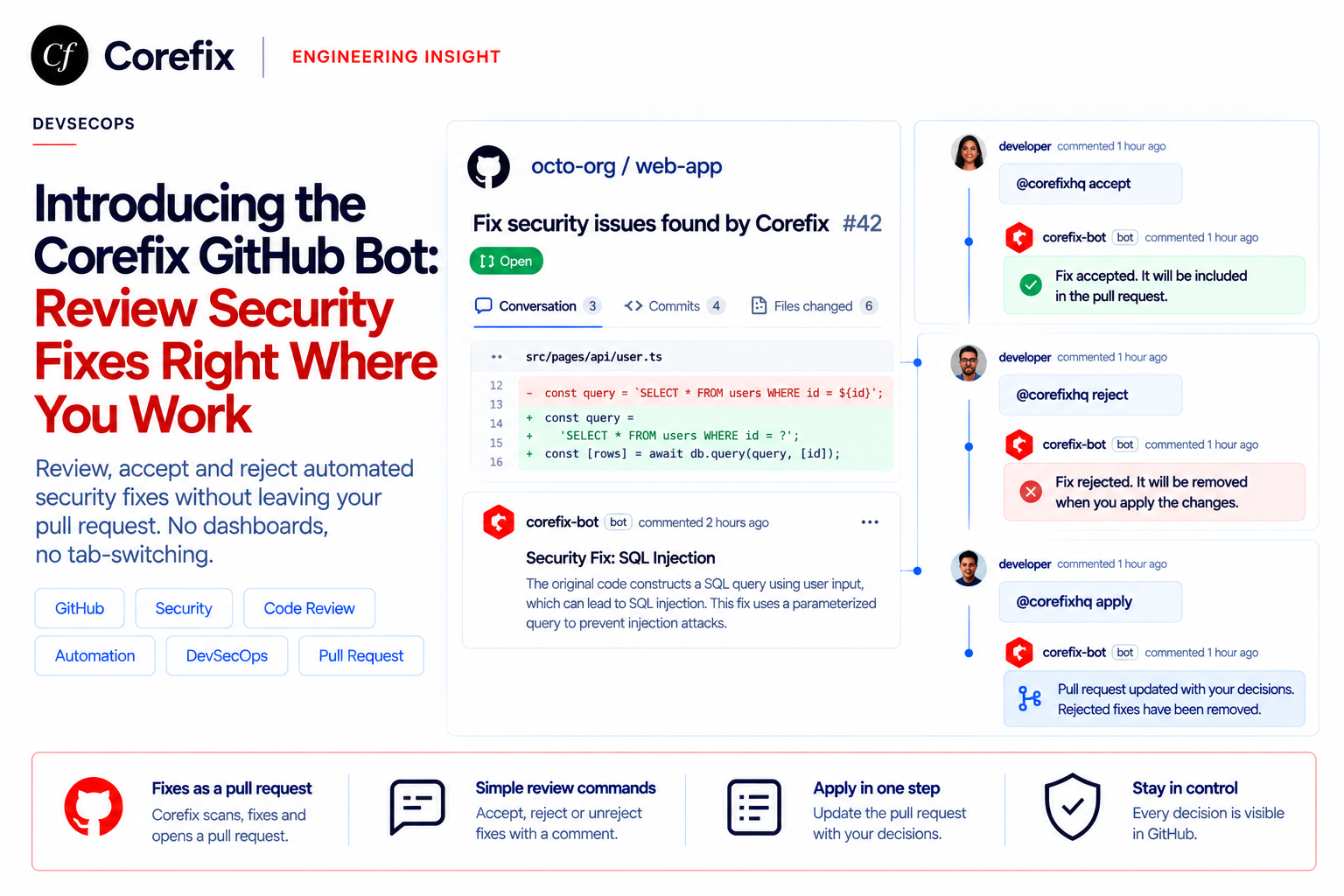
When Corefix scans your code, it doesn't stop at a report. It fixes what it finds and opens a pull request with those fixes, ready for your team to review like any other change.
Every fix is attached to the file it changes, with a short explanation of what was wrong and why the change resolves it. Nothing gets lost in a separate dashboard. It's all in the pull request, next to the code.
Review every fix with a simple comment
You're always in control of what gets merged. Each fix can be reviewed on its own, right inside GitHub, by replying to it with a short command:
| Comment | What it does |
|---|---|
@corefixhq accept | Keep this fix |
@corefixhq reject | Drop this fix from the pull request |
@corefixhq unreject | Changed your mind? Bring a rejected fix back |
The bot responds with a 👍 so you know your decision was recorded.
Every fix is included by default. You don't have to approve each one. Just reject the ones you don't want and leave the rest as they are. If you're happy with everything, there's nothing extra to do.
Apply your decisions in one step
Once you've reviewed the fixes, comment on the pull request:
@corefixhq applyCorefix updates the pull request to match your review. The fixes you kept stay, the fixes you rejected are removed, and you're left with a clean pull request containing only the changes your team agreed on.
No manual reverting, no cherry-picking, no rewriting history by hand.
Know where things stand at a glance
Want a quick overview? Comment:
@corefixhq statusThe bot replies with a summary of the pull request:
- how many fixes were made
- how many have been accepted, rejected or are still waiting for review
- which files were changed
- an overview of what the scan found, by severity
It's useful in stand-ups, handovers, or any time a teammate asks "where are we with the security fixes?"
Why this matters
- No context switching. Review security fixes where you already review code.
- No new tool to learn. If you can leave a comment on GitHub, you can use Corefix.
- Your team stays in charge. Nothing is merged without your review, and every decision is visible in the pull request.
- Faster fixes. Less time moving between platforms means vulnerabilities get resolved sooner.
Get started
Install the Corefix GitHub App on your repositories, and the bot takes care of the rest. Open a pull request, and Corefix scans it, proposes fixes and waits for your review.
Security fixes shouldn't need a detour. With the Corefix GitHub Bot, they don't.