

Most security scanners are blunt instruments. We built the layer that makes them intelligent.
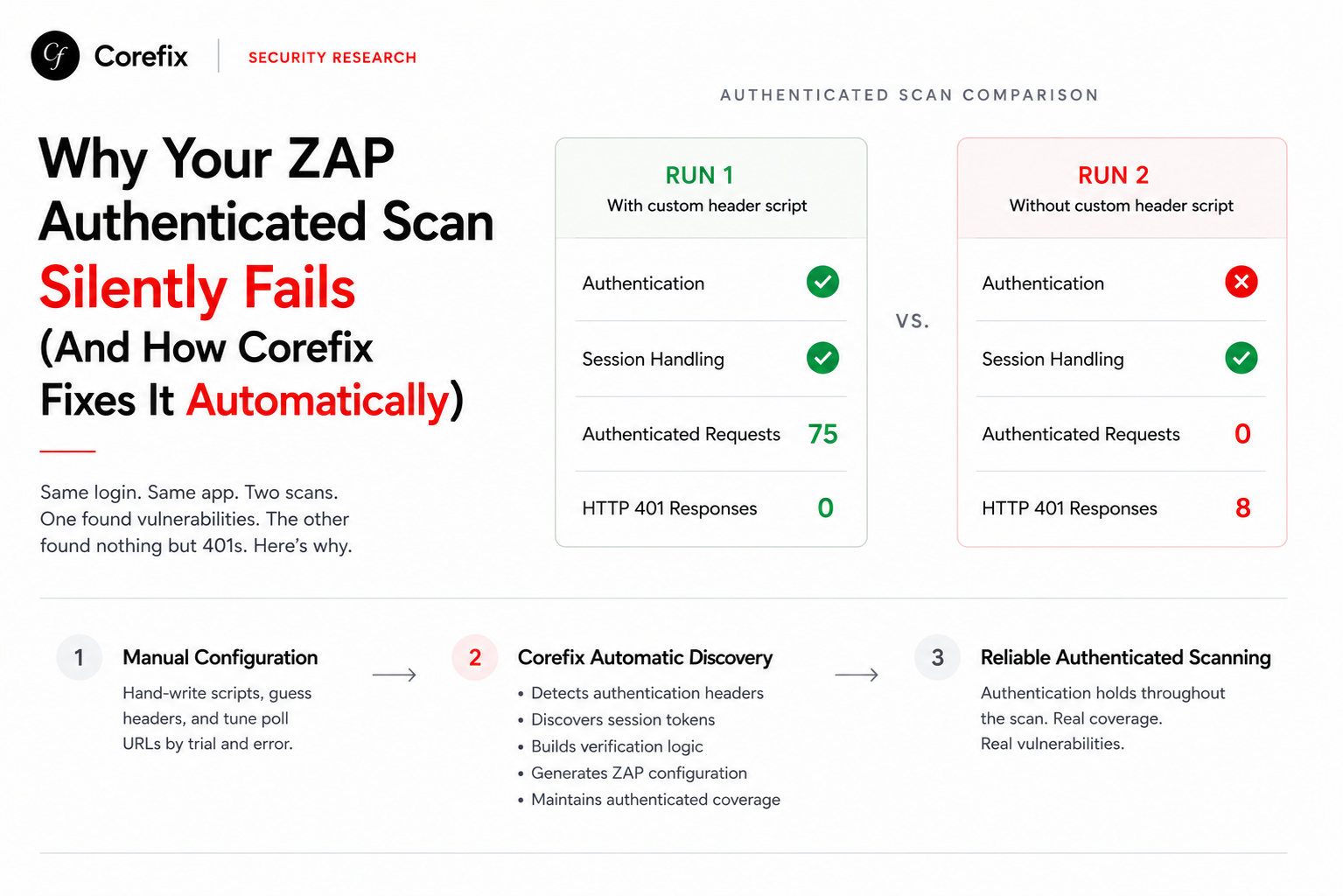
Point a scanner at a URL and it floods your app with requests, misses half the attack surface because it couldn't log in, and produces reports full of noise. The configuration burden falls entirely on you — write the auth scripts, specify the CSRF fields, identify the login selectors, handle the cookie banners. Do it wrong and the scanner never gets past the landing page.
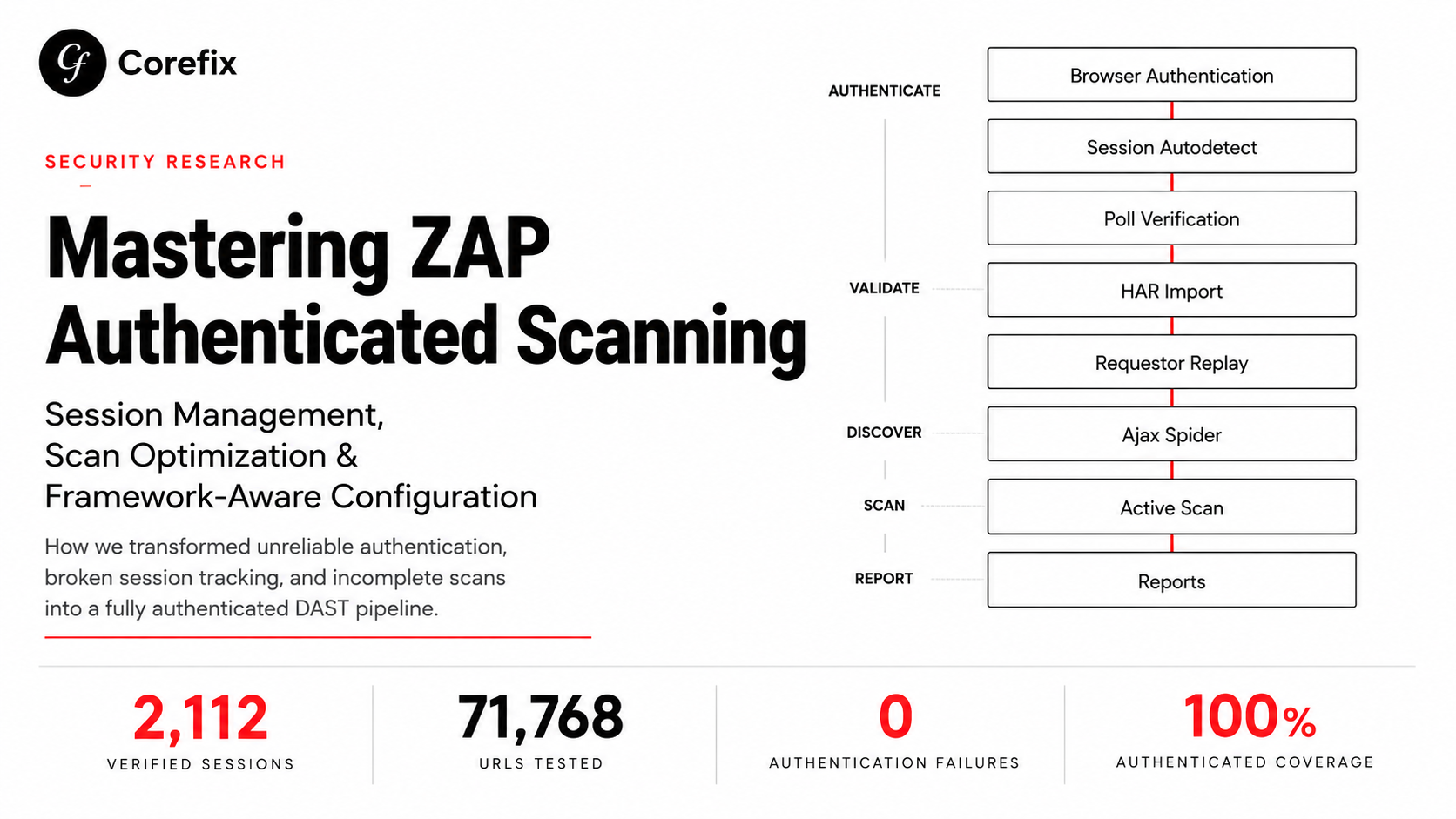
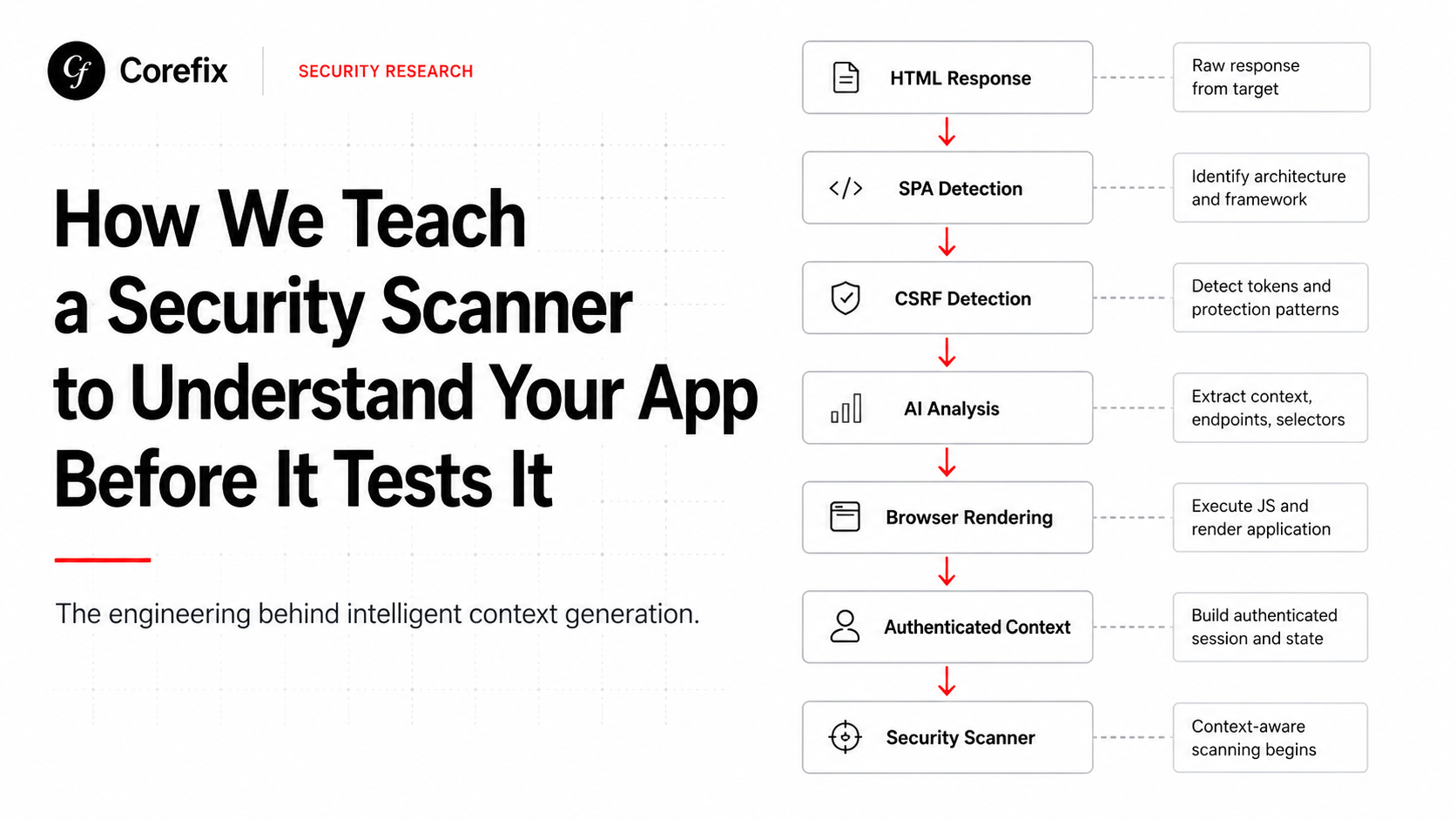
We built a smarter layer that sits in front of ZAP. Before a single probe fires, our system reads your application the way a developer would — understands its architecture, identifies how authentication works, handles the quirks — and hands ZAP a complete, accurate context. The result is broader coverage, real authenticated scanning, and no manual setup.
This is the engineering story behind that layer.
The Problem with Naive Scanning
Web applications today aren't what they were a decade ago. A large and growing share are Single Page Applications — Angular, React, Vue — that serve an essentially empty HTML shell and build the entire UI in the browser via JavaScript. When a scanner fetches https://app.example.com/#/login, the server responds with a few hundred bytes of boilerplate. There's no login form. There are no input fields. There's nothing to scan.
Traditional scanners — and naive automation — treat this as either a blank page or silently proceed with wrong assumptions. They submit requests to nonexistent endpoints. They can't find the password field. They never authenticate, so they never see the parts of your app that actually need testing.
The right approach is to understand what kind of application you're dealing with before you do anything else.
Step 1: Recognising the Application Architecture
The first thing our system does after fetching a login page is determine whether it's a classic server-rendered app or a JavaScript SPA. This matters for every decision that follows.
A naive check — looking for <form> tags and <input> elements — fails immediately for SPAs. Angular applications, for example, use custom element tags like <app-root> rather than standard HTML containers with known IDs.
The reliable signals are different:
- Custom root elements like
<app-root>,<div id="root">,<div id="__next"> - SPA script bundles —
main.js,polyfills.js, chunked JS files with hashed names - Minimal body content — once scripts and link tags are stripped, almost nothing is left
When these signals align, we know we're dealing with a SPA and everything downstream changes accordingly: selector discovery, CSRF detection, authentication flow — all need a different approach.
Step 2: CSRF Detection Without Guessing
CSRF protection is one of the most varied aspects of web authentication. Getting it wrong means the scanner submits requests that the server rejects as forgeries — and the scan never actually tests anything.
We detect CSRF mechanisms in priority order, deterministically, before any AI analysis runs. This gives downstream components high-confidence ground truth rather than inferences.
Priority 1 — Response headers. Some frameworks send a fresh CSRF token directly in a response header (X-CSRF-Token, X-XSRF-TOKEN, etc.). If this header is present, the mechanism is unambiguous.
Priority 2 — Double submit cookies. Angular's built-in CSRF protection sets an XSRF-TOKEN cookie that JavaScript reads and echoes as an X-XSRF-TOKEN request header. We detect this from the Set-Cookie response header and derive the correct header name from the cookie name, rather than hardcoding assumptions.
One subtlety that matters here: if the CSRF cookie is flagged HttpOnly, JavaScript cannot read it, so the double-submit pattern breaks. We surface this as a warning rather than silently proceeding.
Priority 3 — HTML hidden fields. Classic server-rendered apps embed tokens like _csrf or authenticity_token directly in form markup. We extract these with purpose-built regex that handles both attribute orderings (name before value and value before name) and generate the ZAP-compatible extraction regex for each field automatically.
Priority 4 — Meta tags. Laravel, Rails, and Django commonly inject CSRF tokens into <meta name="csrf-token"> tags, bypassing form fields entirely.
For SPAs, the honest answer is often that CSRF fields won't be present in the initial HTML at all — the token only appears after JavaScript runs and the first authenticated API call fires. Our system accounts for this by re-running detection after the browser has rendered the page.
Step 3: AI Analysis of the Login Page
With architecture detected and CSRF ground truth established, we pass the page to an AI analysis step. The AI receives the HTML (or rendered DOM for SPAs), response headers, URLs extracted from script references and fetch calls, and the deterministic CSRF findings.
The AI's job is to identify:
- CSS selectors for the username field, password field, and submit button
- The backend endpoint the login form submits to (
formAction) and its method and content type - Any CAPTCHA presence and type
- Hidden form fields that aren't CSRF or credentials (some apps send additional body parameters)
- Whether a modal, cookie banner, or welcome overlay is blocking the form
That last point (the overlay selector) turns out to be surprisingly important in practice.
For static HTML, the AI works from server-rendered markup and produces reliable results. For SPAs, the selectors and form action are at best educated guesses at this stage, because the actual DOM doesn't exist yet. The AI knows this: it marks its confidence accordingly, and the system triggers a second pass.
Step 4: Headless Browser Rendering for SPAs
When the application is a SPA and the AI couldn't confidently identify selectors, we launch a headless Chromium browser, navigate to the login URL, and wait for the JavaScript to fully execute.
This gives us things the static fetch never could:
- The real rendered DOM with actual input elements present
- Intercepted XHR and fetch calls — when we later simulate a login, we'll see exactly what endpoint the app posts to and what headers and body it sends
- Runtime cookies — Angular sets
XSRF-TOKENafter page load, not in the initial response, so this is often the only way to detect it
After rendering, we re-run the AI analysis on the live DOM. Now the selectors are real. The form action comes from intercepted network traffic, not inference. The CSRF cookie is present in the browser's cookie jar.
Step 5: Dismissing Overlays Before Interacting
Modern web applications have a habit of greeting first-time visitors with things that block the page: cookie consent banners, welcome dialogs, promotional modals. To a headless browser trying to find and fill a login form, these are invisible walls. Clicks on the email field get intercepted by the overlay, or the form itself never renders until the banner is acknowledged.
The AI identifies the dismiss selector for any overlay it detects. Our dismissal logic then tries to close it before attempting any form interaction, with a layered fallback strategy:
- Click the AI-identified dismiss button (most specific, most likely to be correct)
- Try a library of framework-specific generic selectors — Angular Material dialogs, Bootstrap modals, common cookie consent classes
- Send an Escape key press, which closes many CDK and Bootstrap modals that have no obvious button
- As a last resort, remove the overlay elements from the DOM entirely and clear any pointer-blocking CSS the framework left behind
Multiple attempts are necessary because overlay animations introduce timing: a button click may register before the dismiss handler is attached, or one overlay's dismissal reveals another underneath it.
Step 6: Detecting OAuth Redirects
One more edge case that breaks naive automation: some SPAs don't have a login form at all. Navigating to their #/login route triggers a client-side redirect to an external OAuth or SSO provider — Google, Microsoft, Okta.
This redirect is invisible at the HTTP layer. The server returns a 200 with the app shell. Then JavaScript runs, the router fires, and window.location gets set to https://accounts.google.com/.... To a traditional scanner this looks like a successful page load.
We detect it by comparing the browser's current domain after JavaScript has fully executed against the original login domain. If they differ, the application is using external OAuth and we signal this explicitly — triggering a different handling path — rather than proceeding with broken selector assumptions.
What ZAP Gets at the End
By the time we hand off to ZAP, the context is complete:
- Authentication endpoint, method, and content type
- Input field selectors resolved against the real rendered DOM
- CSRF mechanism identified and the correct extraction regex generated
- Session tokens and cookies from a successful login
- Scope correctly bounded to the application's domain
ZAP doesn't need to figure any of this out. It doesn't need to handle the SPA rendering, the overlay dismissal, the CSRF detection, or the OAuth detection. It receives a fully configured context and can focus entirely on what it's good at: systematic vulnerability testing across an authenticated, properly scoped session.
Why We Built Corefix
The gap between "running a scanner" and "running a scanner that actually tests your application" is larger than most people realise. An unauthenticated scan misses every endpoint behind a login wall — which is typically most of the interesting attack surface. A scan that can't handle CSRF will fail silently. A scan pointed at a SPA that doesn't understand SPAs will test the empty shell and report clean.
Corefix implements all six steps automatically. Architecture detection, CSRF identification, AI selector analysis, headless rendering, overlay dismissal, and OAuth detection all happen before the first active scan request fires. There is no YAML to write, no selectors to specify, no CSRF field names to register.
Security coverage reflects what your application actually exposes — not just what a 2005-era scanner could reach.
The scanner should understand your app. Yours doesn't have to understand the scanner.
Corefix automates the full ZAP context pipeline — from architecture detection to authenticated scan. Try Corefix today →